
Loan Related
Points to remember for loan request
How to check outstanding Principal and Interest amount of active Loans in loan file
Please refer to column "Y" for outstanding principal amount and column "Z" for outstanding interest amount as on today.
When a customer asks about the outstanding amount, the agent must add both columns Y and Z and share the current outstanding amount.
Since the attached file is updated monthly, it is possible that if a customer has made a recent loan payment, it will not be reflected in the file. In that scenario, the agent must update the clear case summary and may raise H2H after consulting with support staff.
Further, where there is new loan disbursed in the current month, it will be added to the tracker on month end and hence outstanding balances of new loan issued in the current month will not be available in the tracker till the end of that month.
Process To Apply for Loan
Verification Check point
Documents to process Loan
|
Group |
Interest rate |
|
Group A |
9.24% |
|
Group B |
9.32% |
|
Group C |
9.00% |
The products categorization is mentioned in the Product List attached.
|
|
|
|
Product Name |
Product Group |
|
AL Guaranteed Return Plan |
Group A |
|
AL Guaranteed Return Plan-3 |
Group A |
|
AL Money Back Plan |
Group A |
|
AL Money Back Plus Plan |
Group A |
|
AL Endowment Plan |
Group A |
|
AL Endowment Advantage Plan |
Group A |
|
AL Educare Plan |
Group A |
|
AL Flexi Money Back Plan |
Group A |
|
AL Educare Plus Plan |
Group A |
|
AL Flexi Money Back Plus Plan |
Group A |
|
AL Educare Advantage Insurance Plan |
Group A |
|
AL Flexi Money Back Advantage |
Group A |
|
AL Premier Endowment Regular |
Group A |
|
AL Jeevan Shanti Insurance Plan |
Group A |
|
AL Regular Money Back Insurance Plan |
Group A |
|
AL Jeevan Riddhi Insurance Plan |
Group A |
|
AL Saral Pension |
Group B |
|
AL iGuarantee Vishwas |
Group C |
|
Bandhan Life iGuarantee Max Savings |
Group C |
|
Bandhan Life Guaranteed Income Plan |
Group C |
|
Bandhan Life Shubh Samriddhi |
Group C |
|
Bandhan Life iIncome Wealth |
Group C |
|
Bandhan Life iRetire |
Group C |
|
Bandhan Life iTerm Return of Premium |
Group C |
|
Bandhan Life iGuarantee Assurance |
Group C |
Repayment Of the Loan
Customer can choose to re-pay the loan amount in part or full, any time via NEFT in the bank as per the details provided below.
|
|
||||||||||
|
|
|
||||||||||
|
|
|
||||||||||
|
|
|
||||||||||
|
|
|
On successful payment, Kindy share a confirmation of your payment by sharing the below details on customer.care@bandanlife.com
Agent will raise a request in H2H - the POS team will check with the Corp solution and provide an update on the same
Loan Process
We would like to inform you that to process your loan request, kindly share the following documents:
On receipt of a complete set of these documents, your request will be processed in 7 days.
Process Note
Steps for Frequency Change on iAssist
Frequency change requests can be accepted under the following policy statuses:
For example, if the policy anniversary is on 18th March, the customer must submit the request on or before 18th March. Requests received after the policy anniversary will not be accepted or processed.
GST Refund
Points to remember for GST refund
Existing Process
This is applicable for NRI customers requesting a GST refund on the premium paid. Once the customer submits all the required documents, the agent can compile them into a zip file and share it with Sanjib Bose.
Kapture Tagging
Category: Post issuance
Case reason: Concern_ Post issuance
Sub case reason: Tax related.
Ticket status: Resolved
Request raised
Category: Post issuance
Case reason: Request_ Post issuance
Sub case reason: Tax related.
Ticket status: Resolved
How to apply for GST
We would like to inform you that to be eligible for a GST refund, the premium payments must be made using an NRE bank account. Further, we request you to share the below listed documents:
Anyone Proof of residence (outside India):
1. Tax residency certificate
2. Current utility bill (Should not be older than 3 months)
3. Driving License
4. Certification from Govt./Indian Embassy affirming the place of residence
5. Latest Foreign Bank statement (should not be older than 3 months)
6. Additional necessary documents are listed below:
7. Cancelled NRE A/c cheque or copy of front page of the Passbook of NRE A/c
8. Declaration for not exceeding the stay in India during any financial year for more than one hundred and eighty-two days
9. Bank statement proof for income paid from outside India
10. Original Pan Card copy
11. Mandatory GST form (attached)
Once we receive the complete set of these documents a request to refund GST will be raised and processed in 7 days.
Assignment
Points to remember for Assignment
➢ Customer may give request to assign the policy from the registered email ID
➢ Policy can be assigned to financial i.e. (bank) or non-financial i.e. (individual)
➢ If customer wish to assign the policy complete sum assured amount has to be assigned as no partial assignment can be done
➢To process assignment request customer has to fill and share Notice of Assignment form duly signed by the policy holder
➢Stamp of the Bank / Financial Institutions on the form is required to which the policy will be assigned
➢ Email address of both Assignor and Assignee is mandatory
➢ TAT to process assignment is 7 days
➢ Communication is sent to both the parties on the email addresses registered/ updated with Bandhan
➢ Customer will not be able to free look or surrender and will have to submit a No Objection Certificate (NOC) from the assignee (bank/financial institution/individual)
Note:
FFA Policies - Assignment request to be raised only in mentioned tab - Request -Minor Alteration Non-Transform - Assignment
Ebao policies (New world)- Assignment request to be raised only in mentioned tab - Request - Minor Alteration Transform - Assignment
Assignment
We would like to inform you that if you wish to assign your policy, then the complete sum assured amount has to be assigned because a partial assignment cannot be done.
To process the assignment request please fill and share the notice of assignment form duly signed by the policy holder and the stamp of the bank / financial institutions on the form is also required to which the policy will be assigned.
Please be informed that to process your assignment request the following documents are required:
Please note that, you will not be able to cancel your policy during the free look period or surrender it.
You will have to submit a No Objection Certificate (NOC) from the assignee (bank/financial institution) in case of surrender of your policy or for the cancellation of your assignment.
Once we receive the complete set of these documents, your request will be registered and it will be processed in 7 days.
Change in initial proposal details
Existing Process
NRI Update: Agent to share below draft with customer. When customer shares the required documents, a request is raised and status gets updated in 7 days.
Personal / family medical history: If customer wants to update any details pertaining to medicals about himself or his families he can drop an email to us. If customer has shared any medicals reports agent will raise request and attach the medical reports received. If customer has not shared reports, then also agent can raise request.
New Insurer details: Agent to check previous CRM history if customer has given a request before. Agent can raise request if customer has shared Policy number, Sum assured, Date of commencement, Premium amount, policy status, Policy term, Plan name, Company name. If not then agent will ask customer to share these details with us from his registered email id.
Change in occupation/education: Agent will ask for proof of change. If already shared agent can raise request.
Lifestyle update (Smoking, alcohol etc): If customer wishes to update these details then he will have to share required questionnaires post that agent can raise request.
Documentation:
NRI Update: NRI questionnaire & passport all pages with entry and exit stamps
Personal / family medical history: Medical reports or as requirements raised by UW
New Insurer details: As mentioned above
Change in occupation: Occupation questionnaire
Change in education: Marksheet
Kapture Tagging
If customer is enquiring about process disposition would be
Category: Post issuance
Case Reason: Process Enquiry
Sub Reason: Change in initial proposal details
Ticket Status: Resolved
If we are registering request disposition would be:
Category: Post issuance
Case Reason: Request
Sub Reason: Change in initial proposal details
Ticket Status: Resolved
If we have registered request and customer is asking about status disposition would be:
Category: Post issuance
Case Reason: QRC status
Sub Reason: Change in initial proposal details
Ticket Status: Resolved
Draft
We would like to inform you that if you are merely moving abroad for employment, there is no need to amend anything in the policy as term policies have global coverage and is valid in oversea
If in case residential status has to be changed to NRI then you may give us request to update the same.
You need to send scanned copies of below mentioned documents.
Further please note that, international contact details cannot be updated in policy since no communication is sent on international contact details.
On receipt of the complete set of documents, the request shall be processed within 7 days.
If customer is asking process to update
personal / family medical history
We would like to inform you that we have raised a request to update your medical history and the same shall be processed in 7 days.
Further please be informed that such changes in records are subject to underwriting and if any additional requirements are raised a communication will be sent to you.
If customer has shared reports to update personal / family medical history
We acknowledge the receipt of your reports.
We would like to inform you that we have raised a request to update your medical history and the same shall be processed in 7 days.
Further please be informed that such changes in records are subject to underwriting and if any additional requirements are raised a communication will be sent to you.
New insurer details
We would like to inform you that in order to update your new insurer details we need below mentioned details:
Policy number:
Sum assured:
Date of commencement:
Premium amount:
policy status:
Policy term:
Plan name:
Company name:
Once we receive the required details from your registered email id a request would be raised and same will be processed in 7 days.
Change in Occupation
We would like to inform you that in order to update your new occupation details we request you to kindly fill a share the attached occupation questionnaire from your registered email id.
Once we receive the questionnaire a request will be raised and same will be processed in 7 days.
Change in Education
We would like to inform you that in order to update your educational details kindly share your XXXXX from your registered email id.
Once we receive the document a request will be raised and same will be processed in 7 days.
Lifestyle update
We would like to inform you that in order to update your XXXXXX kindly share XXXXXX from your registered email id.
Once we receive the document a request will be raised and same will be processed in 7 days.
Points to remember for Fund Switch
➢ Customer can place Fund Switch request via iAssist link
➢ If request of Fund switch is processed via iAssist before 3:00PM then fund value will be considered of the current date
➢ If request of Fund switch is processed via iAssist after 3:00PM then fund value will be considered of the next NAV working day
➢ Premium redirection request can be taken if the request is received from registered email ID. Customer will confirm in which new fund the future premiums has to be redirected
➢ It is mandatory for customer to confirm new fund details for the premium to be redirected along with allocation percentage
➢ Premium redirection request to be tagged under below Request in Kapture. Note Case summary of the request has to be elaborative
➢ TAT for premium redirection request is 7 days
Request raised
Category: Post issuance
Case reason: Request_ Post issuance
Sub case reason: Fund Switch
Ticket status: Resolved
We would like to inform you that, to make your fund switch request you can visit our iAssist Portal.
Further, if you do a fund switch before 03:00 PM, current day NAV is applicable.
And, if you do a fund switch after 03:00 PM, next working day NAV is applicable.
Steps for Fund Switch are as follows:
Further, if you experience any issues while switching the funds, kindly share screen shot of the error message on customer.care@bandhanlife.com from your registered email id.
NRO/NRE cheque related
Points to remember for NRO/NRE
Global Coverage
We wish to inform you that the iTerm plan has global coverage and it is valid overseas.
If in case your residential status has been changed to NRI then you may give us a request to update it in our records.
Please be informed that your international contact details cannot be updated in your policy and hence it restricts us from sending any communication regarding your policy.
We would request you to provide us with the following documents mentioned below that will enable us to update your residential status as an NRI in our records.
• Passport copy (All pages – with exit and entry stamp)
• Attached NRI Questionnaire
Once we receive the complete set of documents, your request would be processed in 7 days.
Partial Withdrawal
Points to remember for Partial Withdrawal
➢ Partial withdrawal can be done on Ulip polices after completion of 5 policy years.
➢ The minimum amount of partial withdrawal is Rs. 5,000/- and maximum amount is 20% of the fund value at the beginning of that policy year.
➢ Documents required for partial withdrawal are as below
➢ If in case the customer wants the amount of PW to be transferred in his account via NEFT partial withdrawal request to be tagged under Request -> Partial
withdrawal. (Transform Request)
➢ If in case the customer wants the amount of PW to be applied towards his alternate policy, partial withdrawal request to be tagged under Request -> Partial withdrawal and fund transfer.
( Non Transform Request) Note: In this scenario we do not require bank details or KYC
➢ TAT for this request is 7 days
➢ Request to be taken only if it is received from registered email ID
Partial Withdrawal
We will certainly assist you with the process for partial withdrawal.
We wish to inform you that, a minimum of ₹5000/- and the maximum partial withdrawal allowed is 20% of the fund value in one policy year i.e. XXXXXXX.
To process your partial withdrawal request, please share the following details from your registered email id
On receipt of these documents, your request for partial withdrawal will be processed within 7 days.
Policy features / details
Existing process:
When customer is approaching us to enquire about his policy details and features agent will always refer to customers policy document.
For certain plans revised revival period to be checked in recent updates trail mail as well as self-assistance portal.
Kapture Tagging
Category: Post issuance
Case Reason: Concern_post issuance
Sub Reason: Policy features / details
Ticket Status: Resolved
Proposer and Life Assured
Points to remember in Proposer and Life assured case (In case of Death)
PROPOSER CHANGE PROCESS
We would require the below mentioned documents from the Life Assured to process surrender request in case of unfortunate death of the proposer
1. Surrender request from your registered email ID mentioning the policy number and reason for surrender
2. ID proof – PAN (both the proposer and Life Assured)
3. Address proof - Aadhar Card (both the proposer and Life Assured)
4. NEFT details (kindly share any one of the below mentioned documents)
5. Cancel cheque or bank passbook of new proposer (with name printed on it)
6. Death certificate
7. Death Indemnity form
TAT to surrender the policy is 07 days
PROPOSER CHANGE PROCESS
We would like to inform you that proposer change request can be taken if there is an unfortunate death of the existing proposer.
Following documents are required to process this request.
On receipt of these documents, your request of proposer change will be processed in 07 days.
Rider Related
Points to remember for Rider related queries (old world polices)
Rider draft for ALI policies (addition of AD Rider)
Dear [Customer's Name],
Thank you for reaching out to us regarding your policy number Bandhan Life 00000000 XXXXXXXXX. We appreciate your inquiry and are here to assist you.
We are pleased to inform you that you can opt for the Accidental Death Benefit (ADB) rider through our iAssist portal.
Please follow the steps below to add the rider to your policy:
If you encounter any technical issues during this process, please share a screenshot of the error message displayed on iAssist , and we will investigate the matter promptly.
Further please note that the premium displayed on the iAssist portal while purchasing rider is valid from that moment until your upcoming due date. For the precise rider premium amount, kindly refer to your rider policy document.
Should you have any questions or require further assistance, please do not hesitate to reach out. We are committed to supporting you every step of the way.
Thank you for choosing Bandhan Life Insurance for your insurance needs.
You can also reach us through the following channels:
Regards,
Customer Service
Bandhan Life Insurance Limited
Kapture Tagging
Case Category: Post-Issuance.
Case Reason: Process Enquiry_Post-Issuance.
Sub Case Reason: Rider Related.
Status: Resolved.
Rider draft for ALI policies (error screenshot received)
Dear [Customer's Name],
Thank you for providing the screenshot of the error.
This message is in reference to your email dated [XXXXXX] regarding your policy number Bandhan Life 00000000 XXXXXXXXX. We sincerely apologize for any inconvenience this may have caused you.
Please be assured that we have registered your request concerning the iAssist error, and our team will investigate the issue promptly. We aim to provide you with an update within two working days.
If you have any questions or need further assistance in the meantime, please don’t hesitate to reach out. We are here to support you every step of the way.
Thank you for choosing Bandhan Life Insurance for your insurance needs.
You can also reach us through the following channels:
Regards,
Customer Service
Bandhan Life Insurance Limited
Kapture Tagging
Case Category: Post-Issuance.
Case Reason: Concern_Post-Issuance.
Sub Case Reason: Rider Related.
Status: Internal follow up.
Rider draft for FFA policies
Dear [Customer's Name],
Thank you for reaching out to us regarding your policy number Bandhan Life 00000000 XXXXXXXXX. We appreciate your inquiry.
We would like to inform you that the Accidental Death Benefit (ADB) rider can be added or removed at any time during the policy term. This rider provides an additional sum assured to your nominee in the event of death due to an accident.
To proceed with the addition of the ADB rider, please provide the following documents:
Once we receive these documents, we will process your request for the addition of the ADB rider within 7 calendar days.
If you have any questions or require further assistance, please do not hesitate to reach out. We are here to support you every step of the way.
Thank you for choosing Bandhan Life Insurance for your insurance needs.
You can also reach us through the following channels:
Regards,
Customer Service
Bandhan Life Insurance Limited
Kapture Tagging
Case Category: Post-Issuance.
Case Reason: Process Enquiry_Post-Issuance.
Sub Case Reason: Rider Related.
Status: Resolved.
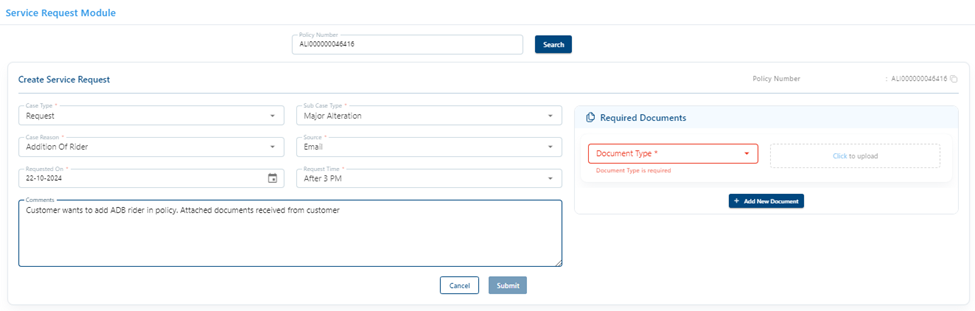
How to raise rider addition request in ops console manually:
Step 1: Open Ops Console and enter policy number

step 2 : In Quick Links select Request Module

Step 3: Open ops console and enter policy number

Step 4: Fill in the mandatory details. Be specific while selecting requested on date and time. Attached all the documents shared by customer along with his email. And click on submit.
TOP UP
Points to remember for TOP up
Kapture Tagging
When customer asks top up process
Category: Post issuance
Case reason: Process enquiry Post issuance
Sub case reason: Top up
Ticket status: Resolved
Top up - iAssist
Please find below easy steps for top up.
1. Log in at https://iassist.bandhanlife.com/
2. Log in with your Aadhar linked mobile number
3. Select “Top up” under “Linked Investments”
4. Enter top up amount and select “Top up premium disclaimer”
5. Click on Proceed
6. Select your mode of payment
7. Enter payment details and proceed
You will receive confirmation once your payment is successful. Premium receipt of the same can also be downloaded via iAssist.
Process Note:
We would like to inform you that your policy status is currently "In Force Paid Up" since the premium payment term has been completed on XXXXX.
Your policy is scheduled to mature on [XXXXX].
2. In force grace period (Monthly)
Please be informed that your policy is currently in “In Force Grace Period” status, as the premium was due on [XXX]. You have a grace period of 15 days from this due date.
To ensure continuity of your policy benefits, please make the payment by [XXXX].
3. In force grace period (Annual)
Please be informed that your policy is currently in “In Force Grace Period” status, as the premium was due on [XXX]. You have a grace period of 30 days from this due date.
To ensure continuity of your policy benefits, please make the payment by [XXXX].
4. Terminated Lapsed (Monthly):
We regret to inform you that your policy has lapsed, and as a result the renewal premium payments can no longer be accepted.
Please be aware that the premium due date was [XXX]. A 15-day grace period was provided following this date, after which the policy had lapsed due to non-payment.
5. Terminated Lapsed (Annual):
We regret to inform you that your policy has lapsed, and as a result the renewal premium payments can no longer be accepted.
Please be aware that the premium due date was [XXX]. A 30-day grace period was provided following this date, after which the policy had lapsed due to non-payment.
6. Terminated-No Reinstatement
We regret to inform you that the status of your policy is “Terminated - No Reinstatement”, This means that your policy has been discontinued and cannot be reinstated as the revival period has expired.
According to the policy terms and conditions, the revival period of XX years began from the last due date (XXXX) of the first unpaid premium and ended on [XXX].
Additionally, as per the policy terms there is no discontinuance amount applicable to your policy.
You may consider applying for a new policy to meet your current needs. Please note that factors such as your present age, health conditions, and income will be taken into account while evaluating your eligibility for a new policy.
7. Terminated-Lapsed to be paid (NEFT detail updated)
We would like to inform you that your policy status is “Terminated - Lapsed to be Paid” due to non-payment of premiums since [XXXX].
Please note that there is a five-year lock-in period. As a result, even though the policy has been terminated, the discontinuance payout will be released only after the completion of five years, i.e., on [XXXX]. The approximate current fund value is Rs. [XXXX/-].
Below are the NEFT details currently updated in our records. You may check the same by visiting our self-service portal iAssist:
Further if you wish to change your updated bank details, please send us one of the following documents from your registered email address, along with a scanned copy of your Aadhaar card or passport:
Once we receive these documents, we will process your request to update the NEFT details within 7 calendar days. You can review your updated details by visiting our self-service portal, iAssist.
8. Terminated-Lapsed to be paid (NEFT detail not updated)
We would like to inform you that your policy status is “Terminated - Lapsed to be Paid” due to non-payment of premiums since [XXXX].
Please note that there is a five-year lock-in period. As a result, even though the policy has been terminated, the discontinuance payout will be released only after the completion of five years, i.e., on [XXXX]. The approximate current fund value is Rs. [XXXX/-].
To update your NEFT details, please send us one of the following documents from your registered email address, along with a scanned copy of your Aadhaar card or passport:
Once we receive these documents, we will process your request to update the NEFT details within 7 calendar days. You can review your updated details by visiting our self-service portal, iAssist.
9. Terminated-Lapsed paid - NEFT
Please be informed that your policy status is “Terminated - Lapsed Paid,” and the discontinuance payout of Rs. [XXXX/-] was released via NEFT on [XXXX].
Below are the NEFT details recorded in our system:
If you have not received the discontinuance payout, please provide your bank statements up to the current date for further investigation.
10. Terminated-Lapsed paid - Cheque
Please be informed that your policy status is “Terminated - Lapsed Paid,” which means your policy has been auto surrendered and the discontinuance payout of Rs. [XXXX/-] was released via cheque on [XXXX].
Below are the cheque details recorded in our system:
If you have not received the discontinuance payout, please provide your bank statements up to the current date for further investigation.
11. In force reduce paid up (need to send this within 180 days):
Please be informed that your policy status is “In Force Reduced Paid-Up,” indicating that the policy remains active but with limited benefits due to non-receipt of premiums since [XXXX].
To fully enjoy all the benefits of your policy, we request that you make the necessary premium payment of XXXXX. You can make your renewal premium payment using any of the following options at your convenience:
Option 1 - You can make an online payment using your credit card, debit
card or net banking by visiting our self service portal iAssist: https://iassist.bandhanlife.com/login/
Option 2 - You can make an online payment using your credit card, debit card, UPI or net banking by visiting our website https://www.bandhanlife.com/pay-my-premium
12. In force reduce paid up-No revival
Please be informed that your policy status is “In Force Reduced Paid-Up No Revival” due to non-receipt of premiums since [XXXX]. The policy cannot be reinstated as the revival period has expired.
According to the policy terms and conditions, the revival period of XX years commenced from the last due date of the first unpaid premium (XXXX) and ended on [XXX].