
Freelook Cancellation for Banca Customers
Points to remember:

Documents required:
Scenario 1
When a customer approaches us to understand the Free Look Cancellation (for example, what is the freelook process), the agent may inform the customer of the tentative payable amount as reflected after clicking on “Get Quote” in the OPS Console. Before communicating the amount, please ensure that applicable deductions are carefully checked and verified. Accordingly, the accurate amount should be shared with the customer.

Scenario 2
When a customer contacts us stating that they wish to opt for Free Look Cancellation (e.g., “I want to free look this policy”), agent should not explain the Free Look process again, even if it is the first interaction regarding this request. Instead, agent should access the OPS Console and verify whether the customer’s bank and PAN details are available and updated in the system. If the required details are already present, agent should directly raise the Free Look Cancellation request in the system and provide confirmation of the same to the customer.
If the policy has been sourced by Banca (how to Check)
Agent can check the same in ops console > Sourcing Details > Sourcing RM name: Bandhan Bank Limited.

How to check deduction charges


Term Plan
Ebao NON-Banca & Banca
Points To Remember:
|
Scenario / Checkpoint |
What to Remember |
Action Required |
|
Request Updates |
Customer will receive notifications at each stage (request raised & processed) |
No action needed; just inform customer proactively |
|
Document Verification |
Incomplete or mismatched documents will lead to rejection |
Inform customer and request correct documents |
|
Name Mismatch Case |
Example: "Santosh Sahoo" vs "Santosh Singh" |
Ask for Gazette Certificate / Marriage Certificate |
|
Backend Completion |
Surrender & auto-debit deactivation confirmation |
Communication will be triggered automatically |
|
Premium Due (Within 7 Days) |
Premium may still get debited |
Guide customer to request excess premium refund via Ops Console |
|
PAN Not Shared but Available in Records (Applicable for Term, TRAD & ULIP) |
If PAN copy is not provided but PAN number is already updated in system records, the surrender request should not be rejected |
Proceed with raising and processing the surrender request |
|
PAN Not Updated in Records (Applicable for Term, TRAD & ULIP) |
PAN is mandatory for processing surrender requests if not available in system records |
Proactively request PAN details from the customer and raise a parallel PAN update request |
|
Surrender Request with PAN & NEFT Not Updated (Applicable for Term, TRAD & ULIP) |
Customer approaches for surrender, but PAN and/or NEFT details are not updated in records |
Simultaneously raise parallel requests for PAN update and NEFT detail update along with the surrender request to avoid delays |
EBAO (Term Plan) Non-Banca Surrender Process:
|
Parameter |
Details |
|
Policy Type |
EBAO (Term Plan) Non-Banca |
|
Process |
Submit surrender request via registered email ID |
|
Documents |
1. Surrender request from registered email ID mentioning policy number and reason for surrender. |
|
2. Copy of cancelled cheque or recent bank statement with customer name, account number, and IFSC code. |
|
|
3. Copy of PAN card. |
|
|
Agent Checks |
Verify policy document for surrender eligibility; Check surrender amount in OPS console or 360 |
|
Auto-Debit Handling |
BBPS: Customer to coordinate with bank for deactivation. |
|
UPI: Customer to deactivate from their end. |
|
|
PolicyBazaar (CCSI/SI): Manual deactivation request to be raised. |
EBAO (Term Plan) Banca Surrender Process:
|
Parameter |
Details |
|
Policy Type |
EBAO (Term Plan) - Banca |
|
Surrender Eligibility |
Surrender value shall become applicable/payable only after completion of the first policy year |
|
Documents |
1. Surrender request from registered email ID mentioning policy number and reason for surrender. |
|
2. Copy of cancelled cheque or recent bank statement with customer name, account number, and IFSC code. |
|
|
3. Copy of PAN card. |
|
|
Agent Checks |
Verify policy document for surrender eligibility; Check surrender amount in OPS console or 360 |
|
Auto-Debit (Bandhan mandate) |
If auto-debit facility is active on the policy, it will be automatically cancelled upon processing the surrender request |
|
TAT |
7 calendar days from receipt of complete documents |
FFA (Term Plan) Surrender Process:
|
Parameter |
Details |
|
Policy Type |
FFA (Term Policy) |
|
Surrender Process |
Submit surrender request via registered email ID |
|
Surrender Value |
Term policies are not eligible for surrender value |
|
Agent Checks |
• Verify policy document for surrender eligibility |
|
• Check the get Quote option in OPS Console /360 for Surrender Value if reflecting agent needs to raise request |
|
|
Points to Remember |
• If premiums are unpaid, policy will lapse automatically |
|
• If customer doesn’t wish to continue, take consent for auto-debit deactivation |
|
|
• Auto-debit deactivation completed within 7 calendar days |
|
|
• Confirmation communication will be triggered post processing |
ULIP
Points To Remember:
|
Scenario |
Guidance |
|
Within Lock-in Period (5 years) |
Share full surrender process |
|
Inform surrender value (approx.), TAT, and lock-in details |
|
|
Amount will be paid only after lock-in completion |
|
|
Post Lock-in Period |
Share surrender process, surrender value & TAT |
|
Amount processed as per current fund value |
|
|
Customer Communication |
Clearly explain payout timelines |
|
Inform reason in case of rejection |
|
|
Guide on required documents if mismatch |
ULIP Policy - Surrender Process
|
Parameter |
Details |
|
Policy Type |
ULIP (Unit Linked Insurance Plan) |
|
Process |
Submit surrender request via registered email ID |
|
Documents Required |
1. Surrender request from registered email ID mentioning policy number & reason |
|
|
2. Cancelled cheque (with name) or latest bank statement (A/c no., Name, IFSC, MICR) |
|
|
3. PAN card copy |
|
Agent Checks |
Verify policy details in Ops Console |
|
|
Check lock-in period (5 years) |
|
|
Confirm surrender value (approx.) |
|
|
Verify bank details availability |
|
Surrender Tagging |
Request → Surrender (Transform Request) |
|
TAT |
7 calendar days |
|
NAV Applicability |
Requests received before 3:00 PM (market day) → Same day NAV |
|
|
Requests after 3:00 PM → Next market day NAV |
|
Payout Rule |
Surrender value = Fund value as on date of complete request |
|
|
Amount credited post processing |
|
Bank Details Handling |
If already updated → No new NEFT required |
|
|
If not / mismatch → Request updated bank proof |
|
Rejection Scenarios |
Incomplete documents |
|
|
Details mismatch (e.g., name mismatch) |
|
Mismatch Handling |
Example: “Santosh Sahoo” vs “Santosh Singh” → Reject |
|
|
Ask for supporting docs (Gazette / Marriage Certificate) |
Auto-Debit Handling
|
Mode |
Action / Handling |
|
BBPS |
Customer to coordinate with the bank for deactivation |
|
UPI Auto-debit |
Customer to deactivate from their end |
|
PolicyBazaar (CCSI/SI) |
Raise manual request for deactivation |
|
Important Scenario |
If due date falls within 7 days of deactivation request, premium may still get debited → Guide customer to request excess premium refund via Ops Console |
|
Communication |
Confirmation will be triggered once surrender + auto-debit deactivation is completed |
Traditional
Points to Remember:
|
Scenario |
Guidance |
|
Customer Intent |
Share complete surrender process along with approx. surrender value and TAT |
|
Eligibility Check |
Must verify policy eligibility before proceeding |
|
Early Surrender Impact |
Inform customer that losses may be high and payout may be lower than premiums paid |
|
Pre-Check in FFA |
Always check surrender value in FFA before sharing process or raising request |
|
Rejection Scenarios |
• Incomplete documents |
|
|
• Details mismatch |
|
Mismatch Example |
“Santosh Sahoo” vs “Santosh Singh” → Request will be rejected |
|
Mismatch Handling |
Ask for Gazette Certificate / Marriage Certificate (if applicable) |
|
Customer Communication |
Clearly inform reason in case of rejection and guide on required documents |
Traditional - Surrender Process
|
Parameter |
Details |
|
Policy Type |
Traditional Savings Plan |
|
Process |
Submit surrender request via registered email ID |
|
Documents Required |
1. Surrender request from registered email ID (policy number & reason) |
|
2. Cancelled cheque / bank statement (Name, A/c no., IFSC) |
|
|
3. PAN card copy |
|
|
Agent Checks |
Verify surrender eligibility in policy document |
|
Check surrender value in FFA before proceeding |
|
|
Confirm approximate payout |
|
|
TAT |
7 calendar days |
|
Payout Rule |
Surrender value may be lower than total premium paid if policy is surrendered before full term |
Auto-Debit Handling
|
Mode |
Action / Handling |
|
BBPS |
Customer to coordinate with the bank for deactivation |
|
UPI Auto-debit |
Customer to deactivate from the end |
|
PolicyBazaar (CCSI/SI) |
Raise manual request for deactivation |
|
Important Scenario |
If due date falls within 7 days of deactivation request, premium may still get debited → Guide customer to request excess premium refund via Ops Console |
|
Communication |
Confirmation will be triggered once surrender + auto-debit deactivation is completed |
Surrender Request & Status Handling
|
Parameter |
Details |
|
Surrender Request Process |
Ensure all required documents are received |
|
Raise Surrender Request |
|
|
Raise NEFT request if bank details are not updated |
|
|
Turnaround Time (TAT) |
7 calendar days |
Surrender Status Tracking
|
Stage |
Agent Action / Communication |
|
Request Raised |
Inform customer: “Your request was registered on (XXX date) and is currently under process.” |
|
In Process |
Inform: “The request will be processed within 7 calendar days.” |
|
Payout |
Inform: “The applicable amount will be credited to your registered bank account. |
Payout Verification
|
Payout Mode |
Verification Steps |
|
NEFT |
Check surrender request date in Ops Console/360 |
|
Verify payout release date in Ops Console/360 |
|
|
Cheque |
Check surrender request date in Ops Console/360 |
|
Verify payout dispatch/release date in Ops Console/360 |
Payout Not Received - Investigation Handling
|
Scenario |
Action Required |
|
NEFT (Not Received) |
If 48-72 hours post payout release |
|
Ask customer to share bank statement (till current date) via registered email |
|
|
Cheque (Not Received) |
If 5-7 days post payout release |
|
Raise H2H request for further investigation |
|
|
Update Timeline |
Team will share update within 24-48 hours |
Surrender request to be processed after the proposer change is completed in death scenarios
Points To Remember:
Once the proposer change request is completed
To proceed with the policy surrender, please provide the following documents.
Upon receipt of these documents, your request to surrender will be processed within 7 calendar days.
Rider Surrender
Points To Remember:
|
Sr. No. |
Point |
Details |
|
1 |
Rider Surrender Request |
Customer may request to surrender the rider added to the policy |
|
2 |
Inbuilt Riders |
Inbuilt riders are not eligible for surrender |
|
3 |
Request Channels |
Customer (ALI & FFA) can place request via Customer Care, HO, or CAMS (HO & CAMS only for non-tech-savvy customers) |
|
4 |
Preferred Mode |
Always promote online option – request via registered email ID to customer.care@bandhanlife.com |
|
5 |
Eligibility Check |
Always check surrender value eligibility using “Get Quote” in Ops Console |
|
6 |
HO Process |
Customer to courier signed request letter/form with ID proof; request raised post verification |
|
7 |
CAMS Process |
Customer submits signed request (blank paper consent) with ID proof; CAMS raises request post verification |
|
8 |
Customer Care Process |
Customer sends request from registered email ID with policy number & reason; request raised post verification |
|
9 |
Non-Registered Email |
Ask customer to resend request from registered email ID |
|
10 |
Retention Attempt |
Agent should attempt retention by explaining benefits / non-eligibility of surrender value (if applicable) |
|
11 |
Request Timeline |
Rider surrender allowed only after 30 days from rider issuance date |
|
12 |
Case Tagging |
Case Reason: Rider Surrender; Sub Case Type: Payout (in Ops Console) |
|
13 |
Status Timeline |
Rider status remains “Surrender Initiated” for 3 days post checker initiation |
|
14 |
Customer Communication |
Acknowledgment, confirmation & rejection shared via all available modes |
|
15 |
Communication Logs |
AWS communications can be viewed under “Communication Logs” in Ops Console |
Process
Point of Contact
Claim Process
Freelook process note for Non Banca:
When customer approaches for freelook cancellation of his policy, they must submit a manual request to us at customer.care@bandhanlife.com with policy number and reason for freelook the policy along with the following documents:
Important point:
Documents Required if you are writing to customer care email ID:
Documents Required if you are visiting service centre:
For BANCA queries: please write on Ops support email address (query_ops@Bandhanlife.com)
For non-BANCA, please write on Partner support partner_opssupport@bandhanlife.com
Note This is not to be shared with customers
Cases can be kept Open:
|
Team |
L1 - Spoc |
Email ID |
L2 - Spoc |
Email ID |
L3 - Spoc |
Email ID |
L4- Spoc |
Email ID |
|
New Business - Non Banca Partner |
Partnersupport |
Sameera Rizvi |
Santosh Kore |
Santosh Kumar |
Cases can be closed
Loan Related
Points to remember for loan request
How to check outstanding Principal and Interest amount of active Loans in loan file
Please refer to column "Y" for outstanding principal amount and column "Z" for outstanding interest amount as on today.
When a customer asks about the outstanding amount, the agent must add both columns Y and Z and share the current outstanding amount.
Since the attached file is updated monthly, it is possible that if a customer has made a recent loan payment, it will not be reflected in the file. In that scenario, the agent must update the clear case summary and may raise H2H after consulting with support staff.
Further, where there is new loan disbursed in the current month, it will be added to the tracker on month end and hence outstanding balances of new loan issued in the current month will not be available in the tracker till the end of that month.
Process To Apply for Loan
Verification Check point
Documents to process Loan
|
Group |
Interest rate |
|
Group A |
9.24% |
|
Group B |
9.32% |
|
Group C |
9.00% |
The products categorization is mentioned in the Product List attached.
|
|
|
|
Product Name |
Product Group |
|
AL Guaranteed Return Plan |
Group A |
|
AL Guaranteed Return Plan-3 |
Group A |
|
AL Money Back Plan |
Group A |
|
AL Money Back Plus Plan |
Group A |
|
AL Endowment Plan |
Group A |
|
AL Endowment Advantage Plan |
Group A |
|
AL Educare Plan |
Group A |
|
AL Flexi Money Back Plan |
Group A |
|
AL Educare Plus Plan |
Group A |
|
AL Flexi Money Back Plus Plan |
Group A |
|
AL Educare Advantage Insurance Plan |
Group A |
|
AL Flexi Money Back Advantage |
Group A |
|
AL Premier Endowment Regular |
Group A |
|
AL Jeevan Shanti Insurance Plan |
Group A |
|
AL Regular Money Back Insurance Plan |
Group A |
|
AL Jeevan Riddhi Insurance Plan |
Group A |
|
AL Saral Pension |
Group B |
|
AL iGuarantee Vishwas |
Group C |
|
Bandhan Life iGuarantee Max Savings |
Group C |
|
Bandhan Life Guaranteed Income Plan |
Group C |
|
Bandhan Life Shubh Samriddhi |
Group C |
|
Bandhan Life iIncome Wealth |
Group C |
|
Bandhan Life iRetire |
Group C |
|
Bandhan Life iTerm Return of Premium |
Group C |
|
Bandhan Life iGuarantee Assurance |
Group C |
Repayment Of the Loan
Customer can choose to re-pay the loan amount in part or full, any time via NEFT in the bank as per the details provided below.
|
|
||||||||||
|
|
|
||||||||||
|
|
|
||||||||||
|
|
|
||||||||||
|
|
|
On successful payment, Kindy share a confirmation of your payment by sharing the below details on customer.care@bandanlife.com
Agent will raise a request in H2H - the POS team will check with the Corp solution and provide an update on the same
Loan Process
We would like to inform you that to process your loan request, kindly share the following documents:
On receipt of a complete set of these documents, your request will be processed in 7 days.
|
Note: 1. If customer is
writing from registered email id self-attested KYC is not needed |
||
|
Request - Update |
||
|
Transaction category |
DIY - Available on iAssist |
Docs Required (Checklist) |
|
GSTN no updation - Ebao |
Yes |
Email
from registered email ID |
|
GSTN no updation - FFA |
No |
|
|
Renewal Premium Receipt |
Yes |
Email
from registered email ID |
|
Unit Statement |
Yes |
Email
from registered email ID |
|
Provisional Tax Certificate |
Yes |
Email
from registered email ID |
|
Annuity benefits - Other Insurance company |
No |
Email
from registered email ID |
|
|
|
|
|
|
|
|
|
Request Minor alteration - Transform |
||
|
Transaction category |
DIY - Available on iassit |
Docs Required (Checklist) |
|
NEFT Change |
Yes |
|
|
Email Id Change |
Yes |
Email
from unregistered email ID |
|
Permanent address change |
No |
Email
from registered email ID |
|
Correspondence address change |
Yes |
Email
from registered email ID |
|
Mobile Number Change |
Yes |
|
|
Edit or Add nominee |
Yes |
Consent
from registered email ID |
|
PAN Change |
Yes |
|
|
Frequency change |
Yes |
Consent
from registered email ID |
|
Name Change |
No |
Email
from registered email ID |
|
Marital Status Change |
No |
Email
from registered email ID |
|
Assignment |
No |
|
|
Removal of Assignment |
No |
Email
from registered email ID |
|
Fund Switch |
Yes |
|
|
Payout Frequency Switch |
Yes |
|
|
Switch to Accumulation |
Yes |
|
|
Policy Document (Hard copy) |
No |
Email from registered email id (As an Exception) |
|
Policy Document (Soft copy) |
Yes |
Email from registered email ID |
|
|
|
|
|
|
|
|
|
Request Minor alteration - Non Transform |
||
|
Transaction category |
DIY - Available on iassit |
Docs Required (Checklist) |
|
NRI Document |
No |
Email
from registered email ID |
|
SPRI (Unclaimed Amount Request) |
No |
Email
from registered email ID |
|
Post Issuance Excess Premium Refund |
No |
Email
from registered email ID |
|
Deletion of Rider |
No |
Email from registered email ID |
|
Correction of proposer DOB (If LA is different) |
No |
Email
from registered email ID |
|
Deletion of Trigger Portfolio option-iMAX/Investment /income benefit |
No |
Email from registered email ID |
|
Removal of invest protect fund option |
No |
Email from registered email ID |
|
Income Benefit Option |
No |
Email from registered email ID |
|
Correction in medical reports |
No |
Email from registered email ID |
|
Loan Repayment Request |
No |
Email
from registered email ID |
|
Automated Payment deletion |
No |
Email from registered email ID (Annual, Semi Annual Policies or Exceptional cases) |
|
Deletion of lifestyle option for pension plan |
No |
Email from registered email ID |
|
Addition of lifestyle option for pension plan |
No |
Email from registered email ID |
|
Premium Redirection - FFA |
Yes - For Ebao policies |
|
|
Assignment |
No |
|
|
Removal of Assignment |
No |
Email
from registered email ID |
|
Happy to Help you |
No |
|
|
HPMS Member addition |
No |
Duly
signed request letter or endorsement form |
|
HPMS Deletion of Member |
No |
Email
from registered email ID |
|
Annuity benefits - Other Insurance company |
No |
Email
from registered email ID |
|
NRI GST waiver |
No |
Email
from registered email ID |
|
IR |
No |
(Policy
to be updated in EIA account) |
|
|
|
|
|
|
|
|
|
Major alteration |
||
|
Transaction category |
DIY - Available on iassit |
Docs Required (Checklist) |
|
Change in initial proposal details - Post issuance |
No |
Email from registered email ID/details which needs to be updated/ Questionnaire If any available in the system |
|
Change in Life Assured DOB |
No |
Email
from registered email ID |
|
LSBO |
No |
Email
from registered email ID |
|
Lifestyle Update |
No |
Email
from registered email ID |
|
Addition of Rider - Ebao |
Yes |
Only if eligible for ebao polices pop up will apprear on iAssist |
|
Addition of Rider - FFA |
No |
Email
from registered email ID |
|
Quit smoking |
No |
Email from registered email ID/ Smoking Questionnaire |
|
Correction of Gender |
No |
Email from registered email ID |
|
Requirement pending COI |
Yes |
Email
from registered email ID |
|
Requirement pending medicals |
No |
Email
from registered email ID |
|
Change of Proposer |
No |
Death
Certificate of old proposer |
|
|
|
|
|
|
|
|
|
Payout |
||
|
Transaction category |
DIY - Available on iassit |
Docs Required (Checklist) |
|
Surrender |
No |
Email
from registered email ID |
|
Partial Withdrawal |
No |
Email
from registered email ID |
|
Freelook - Banca |
No |
Consent
from registered email ID |
|
Freelook |
Yes |
|
|
|
|
|
|
|
|
|
|
ULIP |
||
|
Transaction category |
DIY - Available on iassit |
Docs Required (Checklist) |
|
PWFT |
No |
Email
from registered email ID |
|
SPW |
No |
Email
from registered email ID |
|
Portfolio Type Switch |
Yes - For Ebao policies |
Consent from registered email id |
Process Note: Handling Re-KYC Requests
When a request is received for Re-KYC to update PAN, Address, and Latest Photograph, please follow the below process:
1. Documents shared by the customer is already Updated in ops console:
If the customer has shared documents that are
already updated in ops console,
→ Do not raise separate requests for PAN update or Address update.
→ Proceed with Re-KYC only and upload all the documents in Re-KYC request
Maker Comments (Mandatory)
2. Documents shared by the customer Not Updated in ops console:
If the customer has shared documents that are
not updated in ops console.
→ Raise the following three requests:
Note:
3. Maker Comments (Mandatory)
This ensures proper tracking and avoids duplicate or unnecessary requests.
Refer below screen shot of ops console for Re-KYC request
Ops console screen shot

Reinstatement Document Upload in Universe
Process Overview:
Step 1: Document Collection and Upload
Step 2: Document Verification
Important Considerations:
Exceptions:
Daily Reporting:
Process Note
Steps for Frequency Change on iAssist
Frequency change requests can be accepted under the following policy statuses:
For example, if the policy anniversary is on 18th March, the customer must submit the request on or before 18th March. Requests received after the policy anniversary will not be accepted or processed.
All ULIP’s provide an option to the policyholder to raise a request for premium redirection on his policies during the policy term.
Premium redirection is done when a premium payment is required to be moved or allocated to the correct policy based on customer request or internal verification.
Request Source
For old world policies: customer can place this request at the CAMS office, by approaching HO or by writing to customer care.
Details Required If request received by email
Before processing the request, the following details should be checked:
Details Required If request received at HO / CAMS
Duly signed request letter or endorsement form with fund name and allocation % to be submitted by the customer if request placed at the CAMS service center or if documents couriered to HO.
For ALI policies: Customer can visit iAssist portal to proceed with the request.
Steps for Premium Redirection are as follows:
Important pointers
Policy number: ALICOMM12000353


Communications:


Claim Intimation & Registration – Call Center Process Flow
Important Pointers (for agents)
Scenario 1: Claimant/Nominee Calls for Claim Status
Step 1: Check Communication Logs
“Your request has been forwarded to the claims team. You will receive an update in 5 days.”
Step 2: Identify Pending Requirements from Communication Logs
If Video Verification is Pending
Agent must clearly explain:
Agent to explain the Video Verification process:


Step 3: Handling Video Verification Errors
If the customer mentions:
Agent must:
This avoids repeated follow-ups and incorrect escalations.


Quick Summary (Agent Checklist)
✔ Check Communication Logs
first
✔ Explain Video
Verification requirement clearly
✔ Guide customer on VV
scheduling and documents
✔ Ask for error screenshots
if VV fails
✔ Escalate only to Claims
SPOC when no update is available
EIA (Electronic Insurance Account) process
Points to remember for EIA:
How to open an E-insurance account:
Thank you for writing to us.
This is with reference to your email dated XXXXXX, regarding your Bandhan Life 00000000 XXXXXXXXX.
We'd like to inform you that you can open an E-Insurance account (EIA) by visiting any of the repository websites.
We currently have partnerships with the Insurance Repositories listed below, and you can convert your existing policies into electronic form from any of the Insurance Repositories listed below.
When you open an E-Insurance account (EIA), please send an email with your EIA number, policy number, along with your complete name.
On receipt of the complete set of documents/details, the request shall be processed within 7 calendar days.
Kapture Tagging:
Category: Post issuance
Case reason: Concern_ Process Enquiry _Post issuance
Sub case reason: Policy features / details
Ticket status: Resolved
Request raised
Category: Post issuance
Case reason: Request_ Post issuance
Sub case reason: IR Update.
Ticket status: Resolved

Scenario 1: Customer wants hard copy of policy document
Thank you for writing to us.
This is with reference to your email dated XXX, with regards to <Plan Name> <Policy Number>.
We understand your requirement for a hard copy of the policy document. Please be assured that we have forwarded your request to our relevant team.
Your physical copy of policy document would be dispatched within 7 working days. Once the policy document has been dispatched from our end, tracking details will be sent on your registered contact details.
If you have any questions or need further assistance, please do not hesitate to reach out. We are here to support you on every step of the way.
Thank you for choosing Bandhan Life Insurance for your insurance needs.
You can also reach us through the following channels:
Regards,
Customer Service
Bandhan Life Insurance Limited
Kapture Tagging
Category: Post issuance
Case reason: Request_Post-Issuance
Sub case reason: Policy document
Ticket status: Resolved
Scenario 2: Customer wants hard copy of policy document post changes in policy
Dear XXX,
Thank you for writing to us.
This is with reference to your email dated XXX, with regards to <Plan Name> <Policy Number>.
We understand your request for a hard copy of policy document with the updated details. Please note that there is no provision to provide hard copy with updated changes.
For your convenience, we have attached the updated soft copy of your policy document to this email. Please note that the password to open your policy document is "xxxxddmm," where "xxxx" refers to the last four digits of your policy number, and "ddmm" corresponds to the policyholder’s birth date and month.
If you have any questions or need further assistance, please do not hesitate to reach out. We are here to support you on every step of the way.
Thank you for choosing Bandhan Life Insurance for your insurance needs.
You can also reach us through the following channels:
Regards,
Customer Service
Bandhan Life Insurance Limited
Kapture Tagging
Category: Post issuance
Case reason: Request_Post-Issuance
Sub case reason: Policy document
Ticket status: Resolved
Policy Document
Points to remember on Policy Document

SPOC & TAT details - If soft copy of policy document is not available in ops console
|
Type of query |
TAT |
SPOC |
|
Level 1 |
5 Calendar Days |
Rahul Natesan & Kalpana Sameer Jadhav |
|
Level 2 |
6 Calendar Days |
Sandeep Yadav |
|
Level 3 |
7 Calendar Days |
Sandeep Pawar |
SPOC & TAT details - If customer wants hard / physical copy of policy document
LOB wise process to be followed
Inbound
Chat
Draft Section:
Scenario 1: Customer wants hard copy of policy document
Dear XXX,
Thank you for writing to us.
This is with reference to your email dated XXX, with regards to <Plan Name> <Policy Number>.
We understand your requirement for a hard copy of the policy document. Please be assured that we have forwarded your request to the relevant team.
Your physical copy of policy document would be dispatched within 7 days. Once the policy document has been dispatched from our end, tracking details will be sent on your registered contact details.
If you have any questions or need further assistance, please do not hesitate to reach out. We are here to support you on every step of the way.
Thank you for choosing Bandhan Life Insurance for your insurance needs.
You can also reach us through the following channels:
Regards,
Customer Service
Bandhan Life Insurance Limited
Kapture Tagging
Category: Post issuance
Case reason: Request_Post-Issuance
Sub case reason: Policy document
Ticket status: Resolved
Scenario 2: When customer asks about soft copy of the policy document
Dear XXX,
Thank you for writing to us.
This is with reference to your email dated XXX, with regards to <Plan Name> <Policy Number>.
We are pleased to assist you with your request.
Please find attached policy document for your reference. Additionally, you can access it at any time through our self-service portal, iAssist , by following these steps:
You can also conveniently download your policy document via our WhatsApp chat service. Simply send 'Hi' to 9867452226 and select option '3' from the menu for policy copy.
Please note, the password for accessing your policy document is "xxxxddmm", where "xxxx" represents the last four digits of your policy number, and "ddmm" corresponds to the policyholder’s birth date and month.
If you experience any issues while logging into iAssist or If you are experiencing any issue while downloading the document please contact us at customer.care@bandhanlife.com from your registered email id and a screenshot of the error message.
We will investigate the issue and aim to provide a resolution within 2 working days.
If you have any questions or need further assistance, please do not hesitate to reach out. We are here to support you on every step of the way.
Thank you for choosing Bandhan Life Insurance for your insurance needs.
You can also reach us through the following channels:
Regards,
Customer Service
Bandhan Life Insurance Limited
Kapture Tagging
Category: Post issuance
Case reason: Request_Post-Issuance
Sub case reason: Policy document
Ticket status: Resolved
Scenario 3: If policy document is available in system but customer is facing issues on iAssist.
Dear XXX,
Thank you for writing to us.
This is with reference to your email dated XXX, with regards to <Plan Name> <Policy Number>.
Thank you for bringing this matter to our attention. We sincerely regret the inconvenience caused.
Please find attached policy document for your reference. To access the document, kindly use the password "xxxxddmm", where "xxxx" represents the last four digits of your policy number, and "ddmm" corresponds to policy holders birth date and month.
We have received the screenshot of the error you encountered and have logged a request to investigate the issue with our team and they are working on it, we will provide you with an update within next 2 working days.
If you have any questions or need further assistance, please do not hesitate to reach out. We are here to support you on every step of the way.
Thank you for choosing Bandhan Life Insurance for your insurance needs.
You can also reach us through the following channels:
Regards,
Customer Service
Bandhan Life Insurance Limited
Kapture Tagging
Category: iAssist
Case reason: Concern_iAssist
Sub case reason: Pertaining to situation
Ticket status: Internal Follow-Up
Scenario 4: If customer is unable to download the policy document and the same is not available in ops console:
Dear XXX,
Thank you for writing to us.
This is with reference to your email dated XXX, with regards to <Plan Name> <Policy Number>.
Thank you for your patience, and we sincerely apologize for any inconvenience this may have caused. Your request has been forwarded to the relevant department for further action.
You can expect to hear from us with a resolution within next 7 calendar days.
If you have any questions or need further assistance, please do not hesitate to reach out. We are here to support you on every step of the way.
Thank you for choosing Bandhan Life Insurance for your insurance needs.
You can also reach us through the following channels:
Regards,
Customer Service
Bandhan Life Insurance Limited
Kapture Tagging
Category: Post issuance
Case reason: Concern_Post-Issuance
Sub case reason: Policy document
Ticket status: Internal Follow-Up
Scenario 5: Customer is asking for policy document from unregistered email id – 2 responses to be sent 1 on registered email id and another on registered email id
Unregistered draft:
Dear XXX,
Thank you for writing to us.
This is with reference to your email dated XXX, with regards to <Plan Name> <Policy Number>.
We would like to inform you that the email address from which you have contacted us is not registered in our system. For your security, we have sent our response to your registered email address: XXXXXXXXX.
Due to security protocols, we are unable to process any queries or requests received from unregistered email addresses.
If you would like to update your email address, you can easily do so through our iAssist portal. Please follow the steps below:
If you encounter any issues while updating your email address, please share a screenshot of the error with us for further assistance.
Alternatively, you can update your email by sending us self-attested copies of your address and ID proof. If you're submitting an Aadhaar card, kindly ensure that you strike out or black out the Aadhaar number, except for the last four digits.
Upon receiving these documents, we will process your request to update the email address within 7 calendar days.
If you have any questions or need further assistance, please do not hesitate to reach out. We are here to support you on every step of the way.
Thank you for choosing Bandhan Life Insurance for your insurance needs.
You can also reach us through the following channels:
Regards,
Customer Service
Bandhan Life Insurance Limited
Kapture Tagging
Category: Post issuance
Case reason: Non-registered email id_Post Issuance
Sub case reason: Policy document
Ticket status: Resolved
Response on registered email ID:
Dear XXX,
Thank you for writing to us.
This is with reference to your email dated XXX, with regards to <Plan Name> <Policy Number>.
We are pleased to assist you with your request. Please find your policy document attached for your review.
For your convenience, the policy document is also available on our self-service portal, iAssist . You can access it by following these simple steps:
Alternatively, you can download your policy document through our WhatsApp service. Simply send 'Hi' to 9867452226 and select option '3' from the menu for policy copy.
Please note that the password to access your policy document is "xxxxddmm", where "xxxx" refers to the last four digits of your policy number, and "ddmm" corresponds to your birth date and month.
If you experience any issues while logging into iAssist or If you are experiencing any issue while downloading the document please contact us at customer.care@bandhanlife.com from your registered email id and a screenshot of the error message.
We will investigate the issue and aim to provide a resolution within 2 working days.
If you have any questions or need further assistance, please do not hesitate to reach out. We are here to support you on every step of the way.
Thank you for choosing Bandhan Life Insurance for your insurance needs.
You can also reach us through the following channels:
Regards,
Customer Service
Bandhan Life Insurance Limited
Kapture Tagging
Category: Post issuance
Case reason: Process Enquiry_Post Issuance
Sub case reason: Policy document
Ticket status: Resolved
Steps to check policy document in Ops Console – Document Viewer.
Step 1: Enter policy number, select search and click on document viewer.

Step 2: It will reflect as “POL_DOC"

Step 3: Enter password

Step 4: Agent can view policy document

Steps to check policy document in Ops Console - HM Document Viewer.
Step 1: Enter policy number, select search and click on HM document viewer.

Step 2: Under select document click on “Policy document"

Step 3: Policy document will be downloaded.

Step 4: Enter password

Step 5: Agent can view policy document

Steps to download policy document from iAssist portal
Step 1: Website www.bandhanlife.com & Click on My Policy

Step 2: Enter registered mobile number

Step 3: Enter OTP and click on verify OTP

Step 4: On the home page in the right click on policy document.

Step 5: Click on download document

Steps to download policy document from WhatsApp
Step 1: Ping ‘Hi’ on 9867452226

Step 2: Type option ‘3’ for policy document


Claim on Website
GST Refund
Points to remember for GST refund
Existing Process
This is applicable for NRI customers requesting a GST refund on the premium paid. Once the customer submits all the required documents, the agent can compile them into a zip file and share it with Sanjib Bose.
Kapture Tagging
Category: Post issuance
Case reason: Concern_ Post issuance
Sub case reason: Tax related.
Ticket status: Resolved
Request raised
Category: Post issuance
Case reason: Request_ Post issuance
Sub case reason: Tax related.
Ticket status: Resolved
How to apply for GST
We would like to inform you that to be eligible for a GST refund, the premium payments must be made using an NRE bank account. Further, we request you to share the below listed documents:
Anyone Proof of residence (outside India):
1. Tax residency certificate
2. Current utility bill (Should not be older than 3 months)
3. Driving License
4. Certification from Govt./Indian Embassy affirming the place of residence
5. Latest Foreign Bank statement (should not be older than 3 months)
6. Additional necessary documents are listed below:
7. Cancelled NRE A/c cheque or copy of front page of the Passbook of NRE A/c
8. Declaration for not exceeding the stay in India during any financial year for more than one hundred and eighty-two days
9. Bank statement proof for income paid from outside India
10. Original Pan Card copy
11. Mandatory GST form (attached)
Once we receive the complete set of these documents a request to refund GST will be raised and processed in 7 days.
Step 1: Visit website: https://www.bandhanlife.com/

Step 2: In the top right-hand corner click on “My Policy”

Step 3: Enter your Aadhar linked mobile number & click on submit

Step 4: Enter OTP sent on your registered mobile number

Now you have successfully logged in to iAssist

User Manual for Switch functionality in I Assist for
Login to I Assist with below link
https://iassist.bandhanlife.com/login

Enter registered Mobile number

Enter OTP received on registered mobile number

Landing page after validating OTP.

To register Switch request ( Switch from Cash Bonus Payout to Accumulation and vice versa ) click on Payouts Widget on landing page.

After click on Payouts widget, click on “Update Payout” tab on screen

To register switch request click on “Switch Type” tab on screen
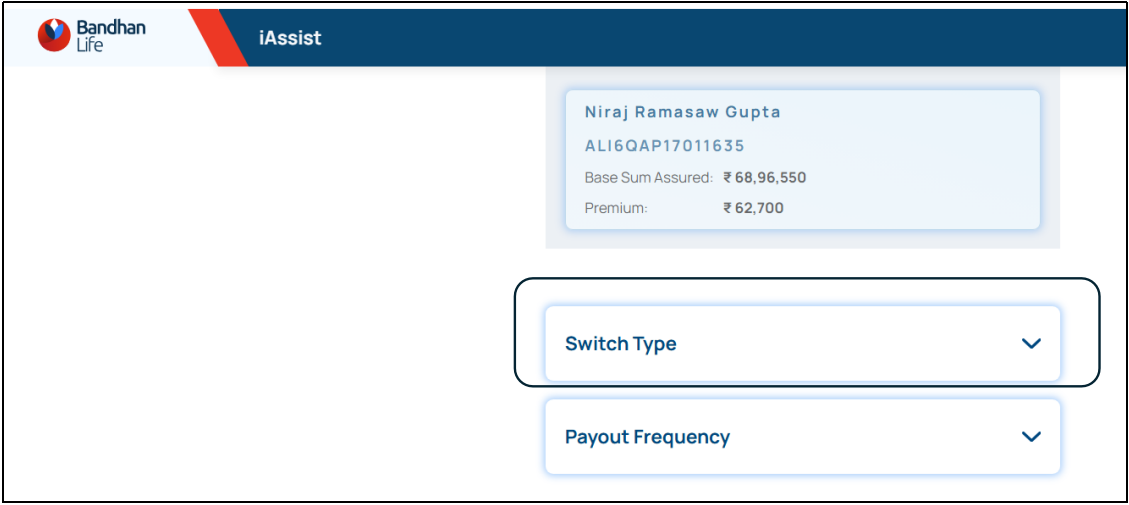
View current Payout Type which is highlighted on screen.

Select new Payout Type and click on “PROCEED” tab on screen.

Provide confirmation to process request

Switch request registered successfully

Service request details can be seen on landing page of I Assist below policy card under “My Service Requests”

Service request created and updated in ops console

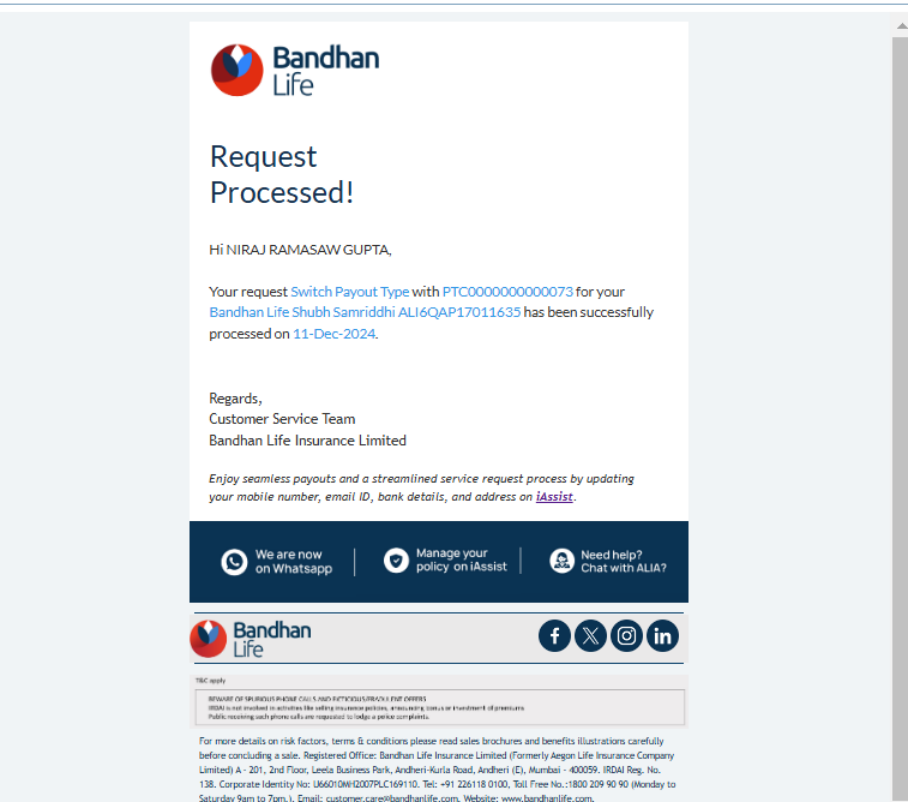
Confirmation Communication via Email and SMS to customer on registered contact details
SMS
Survival Payout can be viewed on iAssist
Screenshots of the journey
Check whether Pay-out centre widget available

Product name, Policy number, Sum assured, Premium and policy status on card.

Check Payout details are reflecting on UI.

After click on view more case
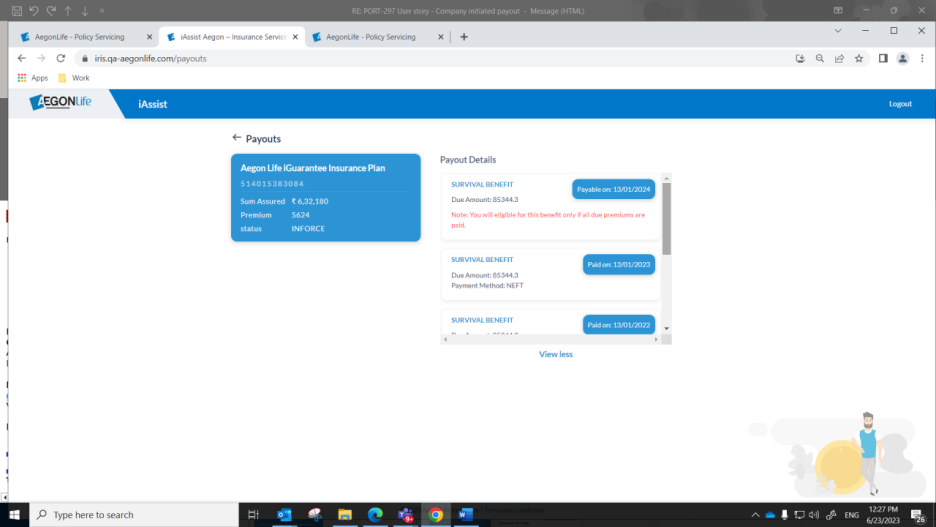
Payout not eligible policy

Step 1: Visit website: https://www.bandhanlife.com/

Step 2: In the top right-hand corner click on “My Policy”

Step 3: Enter your Aadhar linked mobile number & click on submit

Step 4: Enter OTP sent on your registered mobile number

Now you have successfully logged in to iAssist

Step 5: In the right click on See More
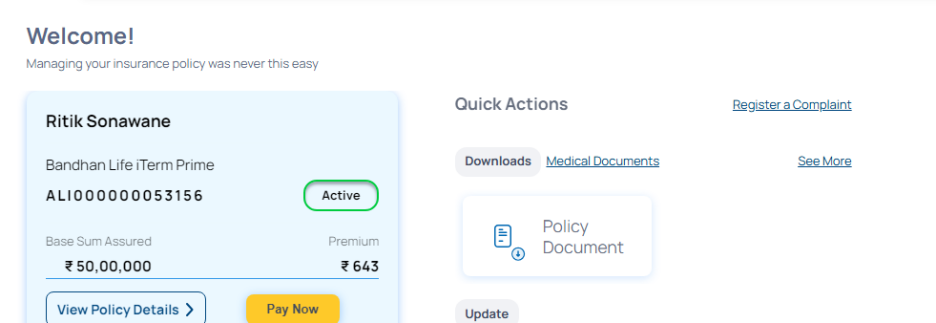
Step 6: Click on download

Step 1: Visit website: https://www.bandhanlife.com/

Step 2: In the top right-hand corner click on “My Policy”
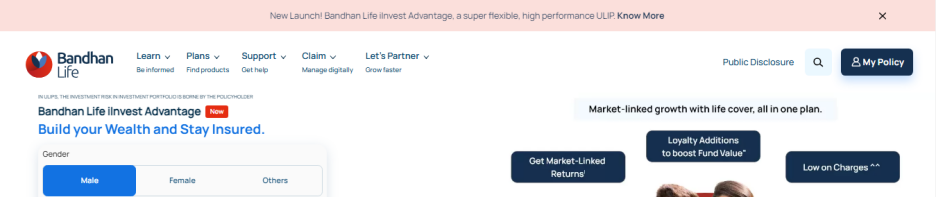
Step 3: Enter your Aadhar linked mobile number & click on submit

Step 4: Enter OTP sent on your registered mobile number

Now you have successfully logged in to iAssist

Step 5: In the right click on See More

Step 6: Customer can download the reports

Step 7: Customer can also click on medical documents on home page

Step 1: Visit website: https://www.bandhanlife.com/

Step 2: In the top right-hand corner click on “My Policy”

Step 3: Enter your Aadhar linked mobile number & click on submit

Step 4: Enter OTP sent on your registered mobile number

Now you have successfully logged in to iAssist

Step 5: In the right click on Policy Document

Step 6: Click on download document. Cm can see the format of password of policy document in the pop up.

Step 1: Visit website: https://www.bandhanlife.com/

Step 2: In the top right-hand corner click on “My Policy”

Step 3: Enter your Aadhar linked mobile number & click on submit

Step 4: Enter OTP sent on your registered mobile number

Now you have successfully logged in to iAssist

Step 5: In the right click on See More

Step 6: Customer can select the financial year he is looking to download premium receipt for.

Step 7: Click on download

Step 1: Visit website: https://www.bandhanlife.com/

Step 2: In the top right-hand corner click on “My Policy”

Step 3: Enter your Aadhar linked mobile number & click on submit

Step 4: Enter OTP sent on your registered mobile number

Now you have successfully logged in to iAssist

Step 5: In the right click on See More

Step 6: Customer can select financial year for which he is looking PTC

Step 7: Customer can download the PTC by clicking on downward arrow

Step 1: Visit website: https://www.bandhanlife.com/

Step 2: In the top right-hand corner click on “My Policy”

Step 3: Enter your Aadhar linked mobile number & click on submit
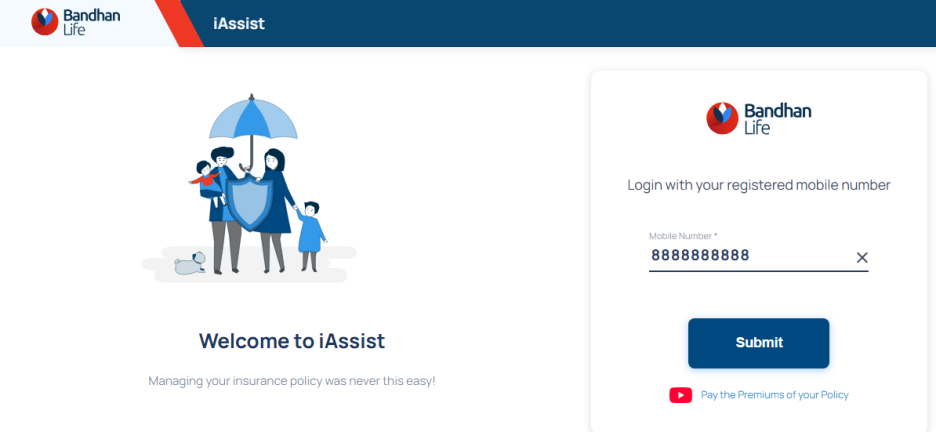
Step 4: Enter OTP sent on your registered mobile number

Now you have successfully logged in to iAssist

Step 5: Click on pay now

Step 6: Customer can see available payment options

Step 7: Customer will have to tick on terms and conditions & click on proceed to payment and pay premium via his preferred mode of payment

Step 1: Visit website: https://www.bandhanlife.com/

Step 2: In the top right-hand corner click on “My Policy”

Step 3: Enter your Aadhar linked mobile number & click on submit
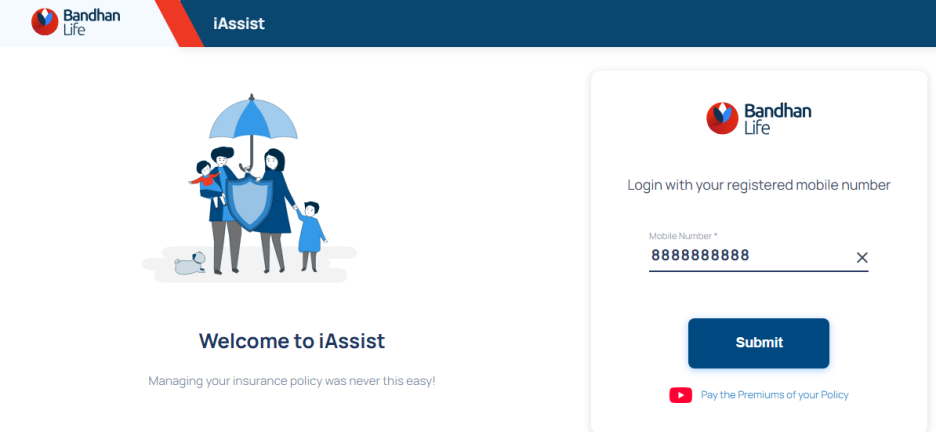
Step 4: Enter OTP sent on your registered mobile number

Now you have successfully logged in to iAssist

Step 5: In the right click on Update Personal Information. Customer can update below mentioned personal details from iAssist. Customer will have to enter his new details, and it will get updated on real-time basis.

Step 1: Visit website: https://www.bandhanlife.com/

Step 2: In the top right-hand corner click on “My Policy”

Step 3: Enter your Aadhar linked mobile number & click on submit

Step 4: Enter OTP sent on your registered mobile number

Now you have successfully logged in to iAssist
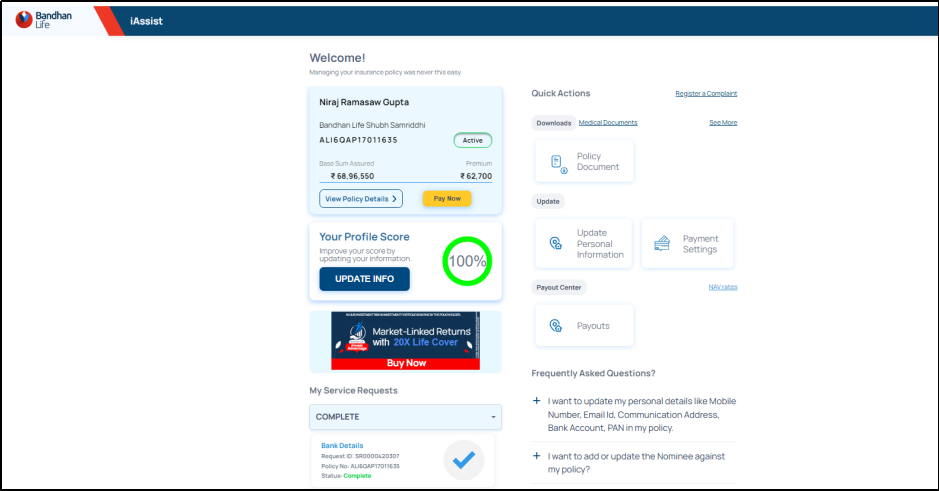
Step 5: Click on view policy details

Step 6: Click on edit

Step 7: Click on add nominee. Customer can add multiple nominees in policy but the total allocation should be 100 %

Frequency change in I Assist ( only for e Bao retail policies )
Login to I Assist with registered mobile number and validate with OTP
After login on landing page, click on payment setting widget
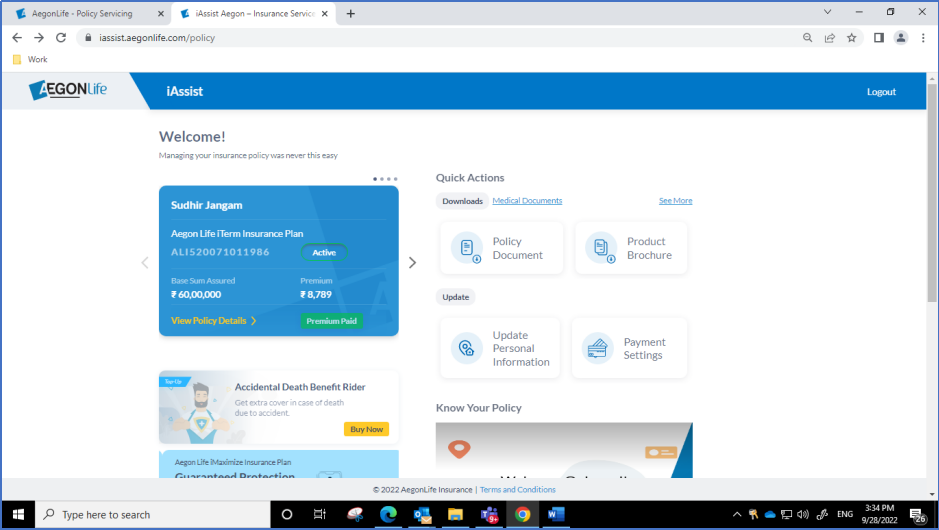
Click on “Premium Payment Frequency” tab

System will show current frequency and Frequencies available for changes.

Select required new frequency and click on Proceed button

New frequency change request will be registered in system

Change in frequency from old to new frequency will be shown in I Assist

SR will be created in Ops console and new frequency will be updated on effective date.

Login Page to iAssist :

Enter registered mobile number to login.

Enter OTP to validate login.

Landing page of iAssist.
1.Click on Fund Overview.

Landing page after Click on Fund Overview.

2.To check NAV rates click on NAV rates.

Select fund from dropdown and enter start date/end date to get results.
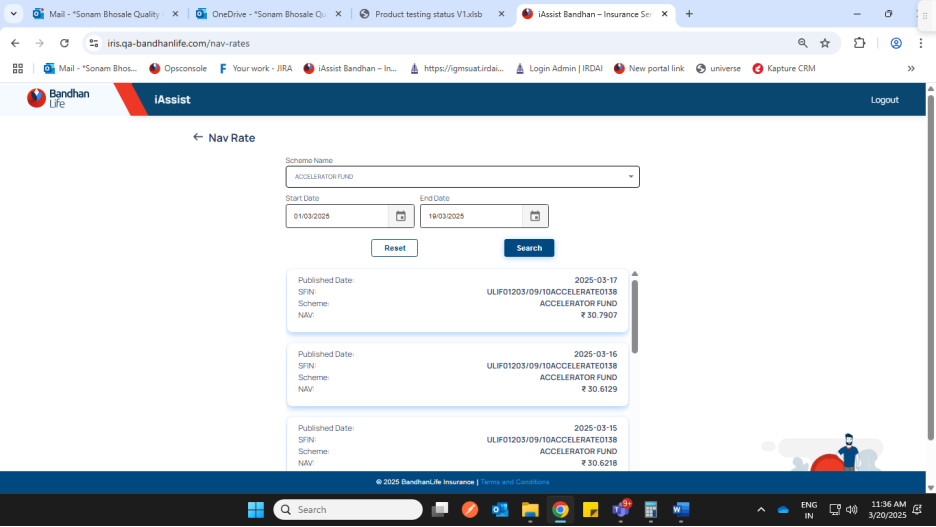
3.Check Fund value and other details of the policy.

4.Policy fund details and its values.

5.Operations
To Register request such as Top up, fund switch, Portfolio Type switch, Premium Redirection and transaction details of the policy, click on Operations button.
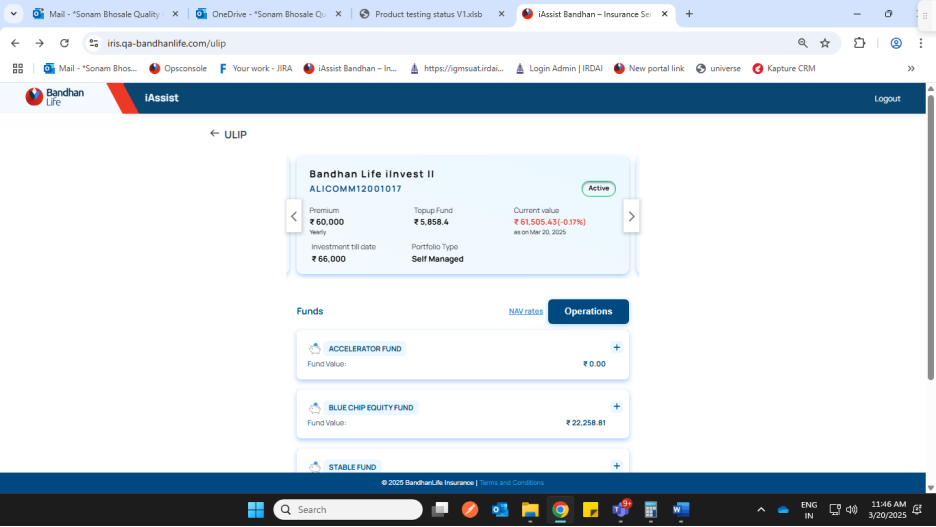

5.A.Transaction details :

5.B. Premium Redirection with validation of total should be 100% :


5.C. Fund switch :

Select new Fund from dropdown and update percentage to be transferred.


5.D. Top up with validation of minimum top up amount.

Enter top up amount more than 5000 and click on proceed to proceed for payment.

After successful payment Top up request would be submitted.

5.E. Portfolio Type switch : Current portfolio is highlighted, select other to switch.

User Manual for Switch functionality in I Assist for
Login to I Assist with below link
https://iassist.bandhanlife.com/login
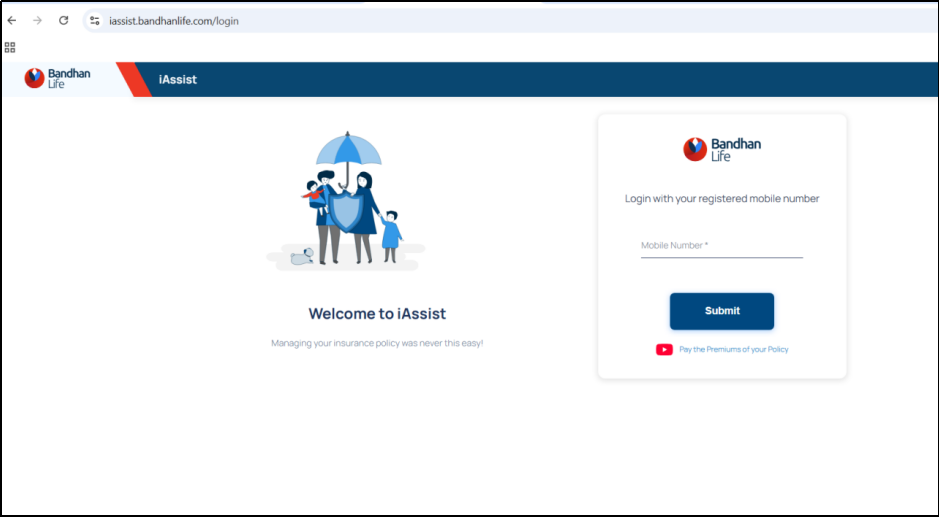
Enter registered Mobile number

Enter OTP received on registered mobile number

Landing page after validating OTP.

To register Switch request ( Switch from Cash Bonus Payout to Accumulation and vice versa ) click on Payouts Widget on landing page.

After click on Payouts widget, click on “Update Payout” tab on screen

To register switch request click on “Switch Type” tab on screen

View current Payout Type which is highlighted on screen.

Select new Payout Type and click on “PROCEED” tab on screen.

Provide confirmation to process request

Switch request registered successfully

Service request details can be seen on landing page of I Assist below policy card under “My Service Requests”

Service request created and updated in ops console

Confirmation Communication via Email and SMS to customer on registered contact details
SMS


Payout frequency change process

Click on update

Select Payout Frequency

Select new payout frequency on UI by click on Get quote
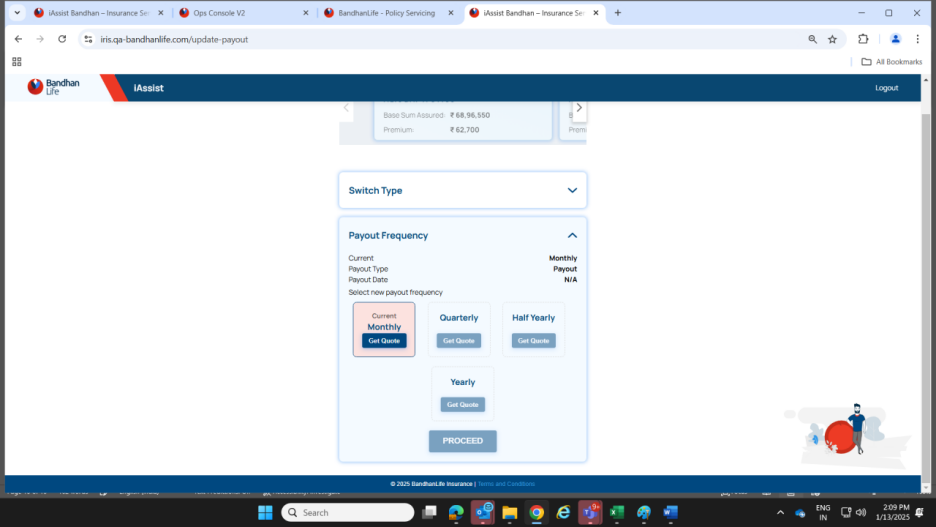
Click on Proceed button to confirm your request


Request will be processed on Policy anniversary

Mandate registration process in I Assist when mandate already registered on policy
Sample policy No. ALI000000068457
Mandate status in ops console


Mandate registration process on I Assist > Click on payment setting widget

If customer mandate active then Auto Debit status will be active. Customer need to select mandate type and click on proceed.


Click in tick box to proceed further for registration


Select appropriate options on Razorpay page for registration


New mandate request registered


Mandate infor tab in ops console also updated

Service request updated as completed and new mandate registered on policy


Communications triggered to customer for new mandate registered on policy

autodebit_registered_email

autodebit_registered_sms

autodebit_registered

I Assist status after new mandate registered

iAssist Functionalities
ction / fie
Process Note: Handling Slight Mismatch in Customer Email ID
Objective:
To guide agents on the appropriate steps to be followed when there is a mismatch between the email ID the customer is writing from and the one updated in the system (Ops Console), but it matches with the one in the proposal form.
Common Examples of Slight Mismatch Email IDs:

These are considered valid if they match the proposal form.
Agent’s Role: Step-by-Step
Verify the Proposal Form
Need to check the proposal form if there’s a slight mismatch in the email ID no need to do it for every case.
Raise a Correction Request
If the email ID in the proposal form matches the one the customer is using to write to us (even if it differs from the system), raise a request to update in the system
No Additional Documentation Needed
Case Summary & Attachment
Inform the Customer
Respond to the customer stating:
“We noticed that the email ID you are writing from is correctly mentioned in your proposal form but was not updated in our system. We have initiated a request to update this in our records.”
Important Note: If the email ID doesn’t match either the Ops Console or the proposal form, please follow the standard process for email ID updates which is available on the KM Portal.
Change in personal details -Unable to update via iAssist
Process to Follow:
If the customer is unable to update details through iAssist,
While raising the H2H request, agent must:
Keep the case in follow-up and inform the customer that it may take 2 working days for resolution.
If there’s no resolution within 2 days,
For all issues related to iAssist,
Documentation required:
Self-attested masked aadhar card, error screenshot and details which needs to be updated
Kapture Tagging
Category: iAssist
Reason: Concern
Sub Reason: Unable to access
Ticket Status: In progress
When iAssist issue is resolved
Category: iAssist
Reason: Concern
Sub Reason: Unable to access
Ticket Status: Resolved
If taking manual request:
Category: As per scenario
Reason: As per scenario
Sub Reason: As per scenario
Ticket Status: In progress
When iAssist issue is resolved post manual request:
Category: iAssist
Reason: Concern
Sub Reason: Unable to access
Ticket Status: Resolved
When iAssist issue is resolved
We regret the inconvenience caused to you.
As confirmed by our team your iAssist issue has been resolved.
Further, we would request you to kindly try updating your XXXXX via iAssist. If the issue persists, request you to share the error screen shot on customer.care@bandhanlife.com
If taking manual request
We would like to inform you that, we have registered your request to update _________ and the same will be processed in 7 calendar days.
The reference number is _________.
Further we are still working on your iAssist concern and shall update you regarding the same in 2 working days.
Request your patience and co-operation in the interim
When iAssist issue is resolved post manual request
We would like to inform you that as confirmed by our team your iAssist issue has been resolved.
Further, we have registered your request to update _________ and the same will be processed in 7 calendar days.
The reference number is _________.
Holding Response for any customer service request received
We wish to inform you that we have forwarded your XXX request to the concern department, and you will receive a reply in XXX working days.
Holding Response for any customer service for investigation
We are in the process of investigating the matter and you will receive a reply in XXX working days.
Change in personal details -Unable to log in to iAssist
Existing process:
If customer is unable to log in to iAssist after completing the Signzy journey:

Documentation required:
Kapture Tagging
when taking request - Category: Post issuance
Case Reason: Request_Post Issuance
Sub Reason: Personal details change
Ticket Status: Resolved
When asking to share documents: Category: iAssist
Case reason: Concern
Sub case reason: Unable to access
Draft
We apologize for the inconvenience caused.
Please be informed that we have raised a manual request to update your aadhar linked mobile number and the same will be updated in 7 calendar days.
Request reference number is XXXXXX.
Acknowledgment notes
For any customer service request received:
For investigation cases:
Existing Process
Drafts Section
Name Change - Normal Process
Dear XXX,
Thank you for writing to us.
This is
with reference to your email dated XXX, with regards to
We will certainly assist you with the process to change the name in the said policy.
Please provide us the below mentioned documents to process your name change request:
A list of acceptable ID proofs is attached for your reference. Please note that expired or outdated documents will not be accepted.
Further, if you’re submitting an Aadhar card then please strikeout/blackout the Aadhar number except the last 4 digits.
On receipt of these documents, your request for name change will be processed in 7 calendar days.
If you have any questions or need further assistance, please do not hesitate to reach out. We are here to support you on every step of the way.
Thank you for choosing Bandhan Life Insurance for your insurance needs.
You can also reach us through the following channels:
Regards,
Customer Service
Bandhan Life Insurance Limited
Kapture Tagging:
Category: Post issuance
Case reason: Process Enquiry
Sub case reason: Personal Details Change
Ticket status: Resolved
Name Change - Post Marriage
Dear XXX,
Thank you for writing to us.
This is
with reference to your email dated XXX, with regards to
We will certainly assist you with the process to change the name in the said policy.
Please provide us the below mentioned documents to process your name change request:
A list of acceptable ID proofs is attached for your reference. Please note that expired or outdated documents will not be accepted.
Further, if you’re submitting an Aadhar card then please strikeout/blackout the Aadhar number except the last 4 digits.
On receipt of these documents, your request for name change will be processed in 7 calendar days.
If you have any questions or need further assistance, please do not hesitate to reach out. We are here to support you on every step of the way.
Thank you for choosing Bandhan Life Insurance for your insurance needs.
You can also reach us through the following channels:
Regards,
Customer Service
Bandhan Life Insurance Limited
Kapture Tagging:
Category: Post issuance
Case reason: Process Enquiry
Sub case reason: Personal Details Change
Ticket status: Resolved
Name Change - Complete name change
Dear XXX,
Thank you for writing to us.
This is
with reference to your email dated XXX, with regards to
We will certainly assist you with the process to change the name in the said policy.
Please provide us the below mentioned documents to process your request for the change of name:
A list of acceptable ID proofs is attached for your reference. Please note that expired or outdated documents will not be accepted.
Further, if you’re submitting an Aadhar card then please strikeout/blackout the Aadhar number except the last 4 digits.
On receipt of these documents, your request for name change will be processed in 7 calendar days.
If you have any questions or need further assistance, please do not hesitate to reach out. We are here to support you on every step of the way.
Thank you for choosing Bandhan Life Insurance for your insurance needs.
You can also reach us through the following channels:
Regards,
Customer Service
Bandhan Life Insurance Limited
Kapture Tagging:
Category: Post issuance
Case reason: Process Enquiry
Sub case reason: Personal Details Change
Ticket status: Resolved
Name Change - Customer wants to update Name however DOB and Sign mismatch
Dear XXX,
Thank you for writing to us.
This is
with reference to your email dated XXX, with regards to
We acknowledge the receipt of your documents.
We have noticed that the date of birth (DOB) mentioned in the ID proof shared by you does not match with the DOB updated in our records.
Please confirm if the DOB mentioned in XXXXXX should be updated in our records as well. Further please note that change in DOB is subject to underwriting. If approved, it would be processed within 7 calendar days.
Additionally,
the self-attested signature on the shared document does not match with the signature
updated in our records. Hence, we request you to resend a scanned self-attested
copy of your
Once we receive complete documents and your consent, then your request to change the name will be processed within 7 calendar days.
If you have any questions or need further assistance, please do not hesitate to reach out. We are here to support you on every step of the way.
Thank you for choosing Bandhan Life Insurance for your insurance needs.
You can also reach us through the following channels:
Regards,
Customer Service
Bandhan Life Insurance Limited
Kapture Tagging:
Category: Post issuance
Case reason: Document Update
Sub case reason: Personal Details Change
Ticket status: Resolved
Name Change - Customer wants to update Name however DOB mismatch
Dear XXX,
Thank you for writing to us.
This is
with reference to your email dated XXX, with regards to
We acknowledge the receipt of your documents.
We have noticed that the date of birth (DOB) mentioned in the ID proof shared by you does not match the DOB updated in our records.
To update DOB in your policy we request you to kindly share your birth certificate. Further please note that the change in DOB is subject to underwriting. If approved, it would be processed within 7 calendar days.[*C1] [SN2]
Once we receive your consent, then a request to change your name as well as date of birth will be raised and processed within 7 calendar days.
If you have any questions or need further assistance, please do not hesitate to reach out. We are here to support you on every step of the way.
Thank you for choosing Bandhan Life Insurance for your insurance needs.
You can also reach us through the following channels:
Regards,
Customer Service
Bandhan Life Insurance Limited
Kapture Tagging:
Category: Post issuance
Case reason: Document Update
Sub case reason: Personal Details Change
Ticket status: Resolved
Name Change - Customer wants to update Name however signature mismatch
Dear XXX,
Thank you for writing to us.
This is
with reference to your email dated XXX, with regards to
We acknowledge the receipt of your documents.
We have observed that the self-attested signature on the document you shared does not match the signature we have on record. Therefore, we kindly request that you resend a scanned self-attested copy of your with the signature matching the one provided in the proposal form.
Once we receive complete documents then your request to change the name will be raised and processed within 7 calendar days.
If you have any questions or need further assistance, please do not hesitate to reach out. We are here to support you on every step of the way.
Thank you for choosing Bandhan Life Insurance for your insurance needs.
You can also reach us through the following channels:
Regards,
Customer Service
Bandhan Life Insurance Limited
Kapture Tagging:
Category: Post issuance
Case reason: Document Update
Sub-case reason: Personal Details Change
Ticket status: Resolved
Request Section
Step 1: Enter the policy number and click on search

Step 2: click on request module

Step 3: Enter details

Step 4: Attach documents and click on submit.

Claim Process
Points to remember on Death Claim

Death claim status
We would like to inform you that we have forwarded your concern to our claims team, and they will contact you in 5 working days.
For any additional information you may send us an email to claims@bandhanlife.com
Death claim process
Dear XXXX,
Thank you for writing to us.
This is with reference to your email dated 0000, regarding your <Plan Name> <Policy Number>
Please accept our heartfelt condolences. We are deeply saddened by your loss.
We would like to inform you that, to process your claim request we require the following documents.
Mandatory documents:
Documents in case of natural death/ death due to illness:
Documents in case of accidental death:
Further, if you’re submitting Aadhar card then kindly mask first 8 digits of your Aadhar number
In case of any additional requirements our claims team will co-ordinate with you.
We request you to share the above-mentioned documents on claims@bandhanlife.com
Once all the requisite documents are received, the claim will be classified as intimated and the Turnaround time (TAT) for claim decisioning as mandated by the Insurance Regulation and Development Authority of India under Policyholders’ Interests (PPHI) Regulations will be calculated
If you have any questions or need further assistance, please do not hesitate to reach out. We are here to support you on every step of the way.
Thank you for choosing Bandhan Life Insurance for your insurance needs.
You can also reach us through the following channels:
Regards,
Customer Service
Bandhan Life Insurance Limited.
Points to remember on WOP
Documents required:
Drafts Section
Waiver of premium on critical illness rider status
Dear XXX,
Thank you for writing to us.
This is with reference to your email dated XXX, with regards to <Plan Name> <Policy Number>.
We would like to inform you that we have forwarded your concern to our claims team, and they will contact you in 5 working days.
For any further information, please feel free to drop an email on claims@bandhanlife.com .
If you have any questions or need further assistance, please do not hesitate to reach out. We are here to support you in every step of the way.
Thank you for choosing Bandhan Life Insurance for your insurance needs.
You can also reach us through the following channels:
Regards,
Customer Service
Bandhan Life Insurance Limited
Kapture Tagging
Case Category: Claim.
Case Reason: QRC Status_claim.
Sub Case Reason: Rider Related.
Status: Resolved.
Waiver of premium on critical illness rider claim process
Thank you for writing to us.
This is with reference to your email dated XXX, with regards to <Plan Name> <Policy Number>.
We request you to provide the following documents in order to proceed with your application for the waiver of premium rider benefit:
If any additional documents / information is required, our claims team will reach out to you.
Please share the above-mentioned documents via email to claims@bandhanlife.com . Once we receive the complete set of documents / information, your rider claim request will be registered and processed within 15 - 45 days.
If you have any questions or need further assistance, please do not hesitate to reach out. We are here to support you in every step of the way.
Thank you for choosing Bandhan Life Insurance for your insurance needs.
You can also reach us through the following channels:
Regards,
Customer Service
Bandhan Life Insurance Limited
Kapture Tagging
Case Category: Claim.
Case Reason: Process Enquiry_Claim.
Sub Case Reason: Rider Related.
Status: Resolved.
Waiver of premium on critical illness if customer shared documents on customer care email id
Dear XXX,
We acknowledge the receipt of your documents.
This is with reference to your email dated XXX, with regards to <Plan Name> <Policy Number>.
We would like to inform you that your documents have been successfully forwarded to our claims team, if any further documents / information is needed, our team shall get in touch with you within the next 5 working days.
Please be rest assured that we are committed to processing your claim, and you can expect it to be completed within 15 – 45 days post we have received complete set of documents / information as required and a request is raised.
For any further information, please feel free to drop an email on claims@bandhanlife.com .
If you have any questions or need further assistance, please do not hesitate to reach out. We are here to support you in every step of the way.
Thank you for choosing Bandhan Life Insurance for your insurance needs.
You can also reach us through the following channels:
Regards,
Customer Service
Bandhan Life Insurance Limited
Kapture Tagging
Case Category: Claim.
Case Reason: Document Update_Claim.
Sub Case Reason: Rider Related.
Status: Resolved.
Process Note for HPMS - Policy Servicing Related
Member addition questionnaire: Uploaded on KM portal under forms section
Drafts Section:
Customer wants to add members in policy
Dear XXXX,
Thank you for writing to us.
This is
with reference to your email dated 0000, regarding your
Please be informed that member addition can be done 15 days prior to due date only i.e. XXXXXX.
To assist you further, we request you to kindly share below mentioned documents with us from your registered email id:
Once a request is raised in our system the same would be processed in 7 calendar days.
If you have any questions or need further assistance, please do not hesitate to reach out. We are here to support you on every step of the way.
Thank you for trusting Bandhan Life Insurance with your insurance needs.
You can also reach us through the following channels:
Regards,
Customer Service
Bandhan Life Insurance Limited
Customer wants to delete members in policy
Dear XXXX,
Thank you for writing to us.
This is
with reference to your email dated 0000, regarding your
Please be informed that member deletion can be done 15 days prior to due date only i.e. XXXXXX.
To assist you further, we request you to kindly share below mentioned documents with us from your registered email id:
Once a request is raised in our system the same would be processed in 7 calendar days.
If you have any questions or need further assistance, please do not hesitate to reach out. We are here to support you on every step of the way.
Thank you for trusting Bandhan Life Insurance with your insurance needs.
You can also reach us through the following channels:
Regards,
Customer Service
Bandhan Life Insurance Limited
When request is raised for member addition
Dear XXXX,
Thank you for writing to us.
This is
with reference to your email dated 0000, regarding your
We acknowledge the receipt of your document. Please be informed that a request has been raised in our system and the same would be processed in 7 calendar days.
Request reference number is SR-XXXXXX.
| Partner | To | cc | |
| Zopper | tushar.varshney@zopper.com astbhuja.tripathi@zopperinsurance.com nilaya.misra@zopper.com |
ratan.kaur@bandhanlife.com janhvi.mahajan@Bandhanlife.com Mandatory CC - @Biz Support |
|
| Vibe | jino@vibeins.com | ratan.kaur@bandhanlife.com janhvi.mahajan@Bandhanlife.com Mandatory CC - @Biz Support |
|
| Haxar | admin5@haxarinsurance.com
manas.das@bandhanlife.com anup.banik@bandhanlife.com |
ratan.kaur@bandhanlife.com janhvi.mahajan@Bandhanlife.com Mandatory CC - @Biz Support |
|
| Megatmo Insurance Ventures LLP | Priyanuj : megatmoventures@gmail.com
Kushal Ghosh : rakhighosh31@gmail.com Manas Kumar Das : manas.das@Bandhanlife.com |
ratan.kaur@bandhanlife.com Mandatory CC - @Biz Support |
|
| Nlvd Assurance (Opc) Pvt Ltd | Mahindar : grievance@nlvd.in | anurag.sharma@Bandhanlife.com rajesh.prasad@Bandhanlife.com Mandatory CC - @Biz Support |
|
| Prosales Financial Services Private Limited | SPOC - Swati Datta swati.datta@andromeda.in
Business SPOC - Amad Mohammad amad.mohammad@andromeda.in Escalation - Arup Chatterjee arup.chatterjee@andromeda.in |
binu.narayanan@Bandhanlife.com Mandatory CC - @Biz Support |
the email ids that are part of BizSupport -
1.) Ratan Deep Kaur - ratan.kaur@bandhanlife.com; 2.) Adarsh Unny - adarsh.unny@bandhanlife.com; 3.) Janhvi Mahajan - janhvi.mahajan@Bandhanlife.com; 4.) Reema Yadav reema.yadav@bandhanlife.com |
| INSURE AAJ IMF LLP | Sethuraman Iyar - SETHURAMAN.SB@INSUREAAJ.COM
Asha Rani - asharani.r@insureaaj.com Santosh Kumar Dash - santosh@insureaaj.com |
Mandatory CC - @Biz Support | the email ids that are part of BizSupport -
1.) Ratan Deep Kaur - ratan.kaur@bandhanlife.com; 2.) Adarsh Unny - adarsh.unny@bandhanlife.com; 3.) Janhvi Mahajan - janhvi.mahajan@Bandhanlife.com; 4.) Reema Yadav reema.yadav@bandhanlife.com |
| Strive Insurance Brokers Private Limited | Suraj - suraj@okbima.com &
Dharmendra - dharmendra@okbima.com |
amol.sinha@bandhanlife.com Mandatory CC - @Biz Support |
Process To be Followed when customer shares UCO bank:
Draft
Dear XXX,
Thank you for writing to us.
This is with reference to your email dated XXX, with regards to
We have received your documents; however, we regret to inform you that we are unable to process payouts via UCO Bank.
To proceed with your request, we kindly ask you to provide an alternative bank account from any other bank. Once we receive the updated details, we will initiate your [XXXX] request, which will be processed within [XX] days.
If you have any questions or need further assistance, please do not hesitate to reach out. We are here to support you on every step of the way.
Thank you for choosing Bandhan Life Insurance for your insurance needs.
You can also reach us through the following channels:
Chat now on WhatsApp: Click here or just send a Hi on 9867452226.
Login to our iAssist portal: iAssist with your Aadhar linked registered contact number to access your policy details and make the required changes.
Regards,
Customer Service
Bandhan Life Insurance Limited
Kapture Tagging:
Claims Touch Point for Intimation:
Send claim documents at our registered office at:
Claims Department
Bandhan Life Insurance Limited
A - 201, 2nd Floor, Leela Business Park,
Andheri-Kurla Road,
Andheri (E), Mumbai - 400059
Claims TAT:
|
Process Activity |
TAT |
|
Without Investigation |
Within 15 days from date of intimation of claim |
|
With Investigation |
Within 45 days from date of intimation of claim |
There are multiple ways through which customers can make the payment for renewing the policy.
Customer can renew policy via:
Below are the touch points for offline payment:
CAMS:
Axis Bank:
Important Note:
Banca sales complaints
Below is the process that would be followed for Banca sales complaints whether received within the FL period or beyond the FL period -
|
Zone |
ZBH |
SPOC |
|
East 1 |
Soumava Dey |
Avisek Ghosh/ Awinash Bhagat |
|
East 2 |
Soumava Dey |
Avisek Ghosh/ Awinash Bhagat |
|
Suru |
Nirjhar Saha |
Avisek Ghosh/ Awinash Bhagat |
|
North |
Akash Pandey |
Rani Tomar |
|
South |
Rajesh Pandey |
NA |
|
West |
Rajesh Pandey |
NA |
Revival Guidelines
|
BLI Retention |
ITP, ITC, SJB, ABT |
All term plans up to v8 |
Trad & UL |
|
All lives |
Premium : Up to 90 days from 1st day of unpaid PTD
|
COI : from 1st day of lapsation |
Up to 31st March
After 31st March
|
Drafts Section
Pre issuance medical reports – FFA customers (After policy is issued)
Dear XXX,
Thank you for writing to us.
This is with reference to your email dated XXX, with regards to <Plan Name> <Policy Number>.
We understand you need the medical reports which were conducted at the time of policy issuance. Please find the requested reports attached for your review.
If you have any questions or need further assistance, please do not hesitate to reach out. We are here to support you on every step of the way.
Thank you for choosing Bandhan Life Insurance for your insurance needs.
You can also reach us through the following channels:
Regards,
Customer Service
Bandhan Life Insurance Limited
Kapture Tagging
Case Category: Post-Issuance
Case Reason: Request_Post-Issuance
Sub Case Reason: Medical Reports
Status: Resolved
Pre issuance medical reports – New World Customers (After policy is issued)
Dear XXX,
Thank you for writing to us.
This is with reference to your email dated XXX, with regards to <Plan Name> <Policy Number>.
We understand you need the medical reports which were conducted at the time of policy issuance. You can easily download the reports via our self-service portal, iAssist . For your convenience, here are the steps to follow:
If you experience any issues while logging into iAssist or If you are experiencing any issue while downloading the document please contact us at customer.care@bandhanlife.com from your registered email id and share a screenshot of the error message.
We will investigate the issue and aim to provide a resolution within 2 working days.
If you have any questions or need further assistance, please do not hesitate to reach out. We are here to support you on every step of the way.
Thank you for choosing Bandhan Life Insurance for your insurance needs.
You can also reach us through the following channels:
Regards,
Customer Service
Bandhan Life Insurance Limited
Kapture Tagging
Case Category: Post-Issuance
Case Reason: Process Enquiry_Post-Issuance
Sub Case Reason: Medical Reports
Status: Resolved
Update Notification Feature on Renewal Page
When a customer navigates to the renewal page on our website, an information icon ('i') is displayed above the fields for the mobile number and email ID. Customers may utilize this feature to update their email ID or contact number specifically for receiving payment receipt for that particular transaction only.
However, please be advised that this update will not alter the email ID or contact number associated with the policy. For updating the mobile number/ Email ID, the customer will have to submit the alteration request via iAssist or via email from his registered email id on customer.care@bandhanlife.com


Shubh Samriddhi Brochure
Dear XXXX,
Thank you for writing to us.
This is with reference to your email dated XXXXXX, regarding your policy number Bandhan Life 00000000 XXXXXXXXX.
We understand that you are looking to re-activate your policy and we are excited to help you to get your life coverage back. To re-activate your policy, you are required to perform the below steps.
Step -1
Visit our self-service portal: https://iassist.bandhanlife.com/login/
Step -2
Click on ‘Re-activate Now’. Submit the Certificate of Insurance (COI) you will hear from us in 5 business days.
You can track your revival status via iAssist . Track my revival is located under the policy card on the home page.
You may receive a message to upload further documents on iAssist . Customers have the option to upload multiple documents on iAssist by clicking on “Add Document” Tab up to 10 MB in size.
Our empaneled medical Center will reach out by a call, if any tests are required. The cost incurred will be borne by you (cost approx. Rs.1800 to Rs.3000). The customer will also receive a communication from us with a link to schedule their own medical test.
Medical reports will be made available on iAssist for customers to download.
We will assess the case after all requirements are fulfilled & you will hear from us in 5 business days
On approval you will receive a payment link to pay outstanding premium, if any. Payment link will be valid for 10 days. You can also pay the premium via our self-service portal iAssist . If you fail to do the payment within the given timeline then you will have to restart the revival process
On successful payment, your policy will be revived.
Ensure that all requirements are fulfilled within 60 days of COI. Failure to do so will result in cancellation of your reinstatement request & you will need to restart the entire process.
Please note that policy revival is subject to a thorough evaluation of your application as per company's board approved underwriting guidelines.
You can also reach us through the following channels:
Regards,
Customer Service
Bandhan Life Insurance Limited
KNOWLEDGE BOOK (BANCA JOURNEY)
Q1. Payment Link not received
Ans: Payment links will be sent only after UW approval. Cases will be cleared within 4 hours TAT.
Support Team: Level 2 Ops Support
Q2. Unable to reset passwords/ SPs not getting password reset code.
Ans: The mobile numbers for SP are not update in bank database. They need to update this information in the bank database, ensuring that the numbers are sourced directly from the bank.
Support Team: Technology/PSM
Q3. SP is not receiving the Lead for Approval/Page not moving.
Ans: Journey is incomplete. Inform customer to click on the resume journey and complete the journey.
Support Team: Level 2 Ops Support
Q4. Unable to complete PIVV journey stuck/PIVV read button not working /Pending documents
Ans: 1. SP rejected the case, so customer need to raise the fresh case
2. If read button not working-PIVV link cases patching will be done from backend by tech team.
Support Team: Tech Team
Q5. SP Unable to see any leads on his portal, unable to approve or reject
Ans:
Support Team: Level 2 Ops Support
Q6. Can we debit from NRO Account?
Ans: Discussion done with the Compliance team on NRO payment, after clarifications payment will be made by the customer.
Support Team: Technology/UW Team
Q7. Nominee relation mother & father not showing
Ans: Due to the age difference between customer and mother being less than 20 years, user not getting option mother after that they selected sister as a nominee
Support Team: Technology/Level 2 Ops Support
Q8. BI link not working
Ans: Smoking question was mandatory hence giving error (patching done by tech team)
Support Team: Tech Team
Q9. Unable to complete PIVV/ PIVV Link not working
Ans:
Support Team: Tech Team
Q10. Pending document queue showing PAN, but it should not be mandatory
Ans: Tech issue was patched from backend by tech team.
Support Team: Tech Team
Q11. Amount deducted but policy not issued
Ans: For ULIP policies -the policy condition is if payment is done before 3 PM policy issued on the same day. Subsequently if payment done after 3 PM policy shall be Issued next working day.
Support Team: L1 Simplified
Q12. Unable to fetch product during Customer onboarding
Ans: User Age was above 57 due to this unable to get any plans.
Support Team: L1 Simplified and Tech Team
Q13. Can NRI customers living abroad log in to the IGV product online if they have an account with Bandhan Bank
Ans: Currently NRI sourcing is not available.
Support Team: L1 Simplified and Tech Team
Q14. KYC Error
Ans:
Support Team: L1 Simplified and Tech Team
Q15. PIVV page stuck
Answer: Policy holder age should be equal or less than 65- need to check in L1 simplified HM events
Support Team: L1 Simplified and Tech Team
Q16. Sales unable to complete journey where LA is 17 years
Ans: Currently system is holding customer of 17 year age and there is a vesting process also included
Support Team: Tech Team
Q17. unable to process journey when single name of father entered
Ans. Post salutation entered client was able to proceed ahead with the journey
Support Team: Tech Team
Q18. SP approved case not set up
Ans. Due to multiple attempts journey got corrupted highlighted to tech team resolved from backend and case got set up
Support Team: Tech Team
Q19. SP active /inactive status
Ans: Check in L1 simplified the current status of SP.
Support Team: L1 Simplified and Tech Team
Q20. PIVV – other local languages
Ans: PIVV required in Gujarati (currently available in English, Hindi and Bengali)
Support Team: Level 2 Ops Support
Q21. Nephew not showing under Nominee relationship option
Ans: As per guidelines only close blood relation can be added as nominee hence the same is not available
Support Team: Level 2 Ops Support
Q22. Private teacher not showing under Nature of business
Ans: As per current process same is not available. However, feedback has been shared to respective team
Support Team: Level 2 Ops Support
Q23. Journey not complete requesting for cancellation
Ans: We do not cancel journey incomplete cases the quote will expire automatically post TAT completion- 30 days
Support Team: Level 2 Ops Support
Q24. Can customer opt for physical copy of Policy Document (Banca & Other Partners)
Ans: For soft copy client can download policy document from I assist and Physical bond will be sent to policies logged in, on or after 1st July 2024
Support Team: Level 2 Ops Support (Rahul Natesan and Kalpana Sameer Jadhav)
Q25. OCR Related error
Ans: 601 error occurs when masked Aadhar is uploaded by sales in the journey or where only year of birth is updated on the Aadhar card.
Support Team: Level 2 Ops Support
Q26. Payout related- Shubh Samriddhi (payout type)
Ans: customer can change payout type (eg. cash bonus to accumulation or vice versa) by visiting iAssist 15 days prior before the next payout date.
Support Team: Level 2 Ops Support
Q27. Payout related- Shubh Samriddhi (payout frequency)
Ans: if customer wishes to change cash bonus payout Frequency. Customer can write to query_ops@bandhanlife.com requesting for the same However, it will be effective from the next policy anniversary.
Support Team: Level 2 Ops Support
Change of Bank in Auto Debit
Existing Process
Agent to check in system if any auto debit is registered and inform customer to register for fresh auto debit
Kapture Tagging
Disposition: Category: Payment
Case Reason: Concern_Payment
Sub Reason: Auto debit
Ticket Status: Resolved
Debit Card/Net Banking (Auto Debit process)
We wish to inform you that, you can register E Mandate from your saving account by visiting our Self-service portal iAssist. For better understanding please follow the below steps.
• Visit: https://iassist.bandhanlife.com/login/
• Login With your Registered Mobile number
• Enter OTP
• Click on “Payment Settings”
• Enable the button by moving it from left to right to activate auto debit
• Select the options of “Debit Card/Net banking”
• Click on “Proceed”
• By default Debit Card/Net banking option will reflect on this page to be selected
• Click on the check box “ I agree with the terms & conditions” & “I agree to the auto deduction of the renewal premium from the selected mode of payment”
• Click on “Proceed to Payment”
• Click on “Bank Account” and select “Debit Card” or “Net Banking”
• Enter the bank account details and click on “Authenticate”
• You will receive a confirmation that auto debit is enabled
If you experience any problem while registering auto debit via iAssist you can send an email to customer.care@bandhanlife.com with a screenshot of the error message so that we can investigate it and address your issue.
An update will be shared with you within 2 working days.
Premium not auto debited due to change in premium amount
Existing Process
Agent to check in system for reason why existing premium amount has been changed (Counteroffer, LSBO or any other reason)
Kapture Tagging
Disposition: Category: Payment
Case Reason: Concern_Payment
Sub Reason: Online / offline premium payment - Renewal
Ticket Status: Resolved
Debit Card/Net Banking (Auto Debit Activation Process)
We wish to inform you that, you can register E Mandate from your saving account by visiting our Self-service portal iAssist. For better understanding please follow the below steps.
• Visit: https://iassist.bandhanlife.com/login/
• Login With your Registered Mobile number
• Enter OTP
• Click on “Payment Settings”
• Enable the button by moving it from left to right to activate auto debit
• Select the options of “Debit Card/Net banking”
• Click on “Proceed”
• By default Debit Card/Net banking option will reflect on this page to be selected
• Click on the check box “ I agree with the terms & conditions” & “I agree to the auto deduction of the renewal premium from the selected mode of payment”
• Click on “Proceed to Payment”
• Click on “Bank Account” and select “Debit Card” or “Net Banking”
• Enter the bank account details and click on “Authenticate”
• You will receive a confirmation that auto debit is enabled
If you experience any problem while registering auto debit via iAssist you can send an email to customer.care@bandhanlife.com with a screenshot of the error message so that we can investigate it and address your issue.
An update will be shared with you within 2 working days.
Change of Bank in Auto Debit
Existing Process
Agent to check in system if any auto debit is registered and inform customer to register for fresh auto debit
Kapture Tagging
Disposition: Category: Payment
Case Reason: Concern_Payment
Sub Reason: Auto debit
Ticket Status: Resolved
Debit Card/Net Banking (Auto Debit process)
We wish to inform you that, you can register E Mandate from your saving account by visiting our Self-service portal iAssist. For better understanding please follow the below steps.
• Visit: https://iassist.bandhanlife.com/login/
• Login With your Registered Mobile number
• Enter OTP
• Click on “Payment Settings”
• Enable the button by moving it from left to right to activate auto debit
• Select the options of “Debit Card/Net banking”
• Click on “Proceed”
• By default Debit Card/Net banking option will reflect on this page to be selected
• Click on the check box “ I agree with the terms & conditions” & “I agree to the auto deduction of the renewal premium from the selected mode of payment”
• Click on “Proceed to Payment”
• Click on “Bank Account” and select “Debit Card” or “Net Banking”
• Enter the bank account details and click on “Authenticate”
• You will receive a confirmation that auto debit is enabled
If you experience any problem while registering auto debit via iAssist you can send an email to customer.care@bandhanlife.com with a screenshot of the error message so that we can investigate it and address your issue.
An update will be shared with you within 2 working days.
TDS certificate
Existing Process
Documents
Date of Payment & PAN Card (Pan Number)
Kapture Tagging
Disposition: Post-Issuance
Case Reason: Concern post-issuance
Sub Reason: Tax Related
Ticket Status: Internal Follow Up
Dear XXXX,
Thank you for writing to us.
This is with reference to your email dated XXXXXX, regarding your Bandhan Life 00000000 XXXXXXXXX.
As per your request please find attached the copy of TDS certificate.
We assure you our best service always.
Should you require any further assistance, feel free to connect with us.
Annuity Process
Before the Maturity
The company will send an advance communication to the policyholder before the due date of maturity to opt annuity plan.
On Maturity
Process to opt for new annuity plan.
Surrender applicable or not.
Documents
Non-medical requirement related (Pre issuance)
Existing Process
When customer shares non-medical requirements agent to share the same with Pooja Landge and inform customer that it has been forwarded and case to be closed from agents end.
Documentation
Non-medical requirements raised
Kapture Tagging
When customer shares non-medical docs-
Category: Pre issuance
Case reason: Document update_Pre issuance
Sub case reason: Non-medical requirement related
Ticket status: Resolved
Application / Issuance status
We would like to inform you that we have forwarded your concern to our relevant team, and they shall get back to you in 2 working days.
Application / Issuance status
Existing Process
When customers policy is not issued yet and he is asking about his status agent to drop an email to Pooja Landge (ALI52) and Sandeep Yadav for (ALI0000)
Kapture Tagging
If customer enquiries about policy issuance status:
Category: Pre issuance
Case reason: Concern
Sub case reason: Application issuance / Status
Ticket status: Resolved
Draft
We would like to inform you that we have forwarded your concern to our relevant team, and they shall get back to you in 2 working days.
Additional requirements asked by UW
Existing Process (Reinstatement)
1. Customer login in iAssist portal and check for RI status.
2. If there are any pending additional requirements then customer can upload the same via iAssist portal under “Add Document” TAB up to 10 MB in size.
3. Once these requirements are received, case is assigned to UW team for decision.
4. If a customer is unable to upload documents via iAssist, the agent must ask for the reason and simultaneously take a manual request in the OPS console. The agent should include the documents, the reason for the inability to upload, and an error screenshot of the iAssist portal while uploading the documents.
Documentation:
Docs asked by UW team
Kapture Tagging
Category : Post Issuance
Case Reason : Concern Post Issuance
Sub Case Reason : Additional requirements by UW
UW additional requirements are raised
We wish to inform you that the below mentioned requirements are raised to process your reinstatement request. You can also track your reinstatement status via our self-service portal iAssist.
You may receive a message to upload further documents on iAssist. Kindly upload each document under “Add document” TAB up to 10 MB in size
Our empaneled medical centre will reach out by a call if any tests are required. The cost incurred will be borne by you (cost approx. Rs.1800 to Rs.3000). The medical reports will be shared with Bandhan Life.
We will assess the case after all requirements are fulfilled & you will hear from us in 5 business days.
On approval of your request, you will receive a payment link which will be valid for 10 days. You can also pay the premium via our self-service portal iAssist. If you fail to do the payment, then you will have to restart the revival process.
All medical and non-medical requirements must be fulfilled within 60 days of the submission of the Certificate of Insurability (COI) Failure to do so will lead in the cancellation of the reinstatement request, and you will have to restart the entire process.
Please note that policy revival is subject to a thorough evaluation of your application as per company's board approved underwriting guidelines.
Customer shares Additional Requirements on email
We acknowledge the receipt of your documents.
The request for your policy reinstatement is registered with reference number AL-XXXXXXX-XXXXXX
You can also track your revival status by logging on to iAssist. Track my revival is placed below the policy card and above the service request section.
We will assess the case after all requirements are fulfilled & you will hear from us in 5 business days.
On approval of your reinstatement request, you will receive a payment link which will be valid for 10 days. You can also pay the premium via our self-service portal iAssist. If you fail to do the payment you will have to restart the revival process.
Please note that policy revival is subject to a thorough evaluation of your application as per company's board approved underwriting guidelines.
Customer shares Incomplete Additional Requirements
We acknowledge the receipt of your documents.
We would like to notify you that we require the following documents to process your policy reinstatement request.
We request you to kindly upload the pending documents via our self-service portal iAssist. Kindly upload each document under “Add document” TAB up to 10 MB in size
We will assess the case after all the requirements are fulfilled & you will hear from us in 5 business days.
You can also track your revival status by logging on to iAssist. Track my revival is placed below the policy card and above the service request section.
All medical and non-medical requirements must be fulfilled within 60 days of the submission of the Certificate of Insurability (COI). Failure to do so will lead in the cancellation of the reinstatement request, and you have to restart the revival process.
On approval of your reinstatement request, you will receive a payment link which will be valid for 10 days. You can also pay the premium via our self-service portal iAssist. If you fail to do the payment you will then have to restart your policy revival process.
Please note that policy revival is subject to a thorough evaluation of your application as per company's board approved underwriting guidelines.
Reinstatement Process - Term Plan
Dear XXXX,
Thank you for writing to us.
This is with reference to your email dated XXXXXX, regarding your Bandhan Life 00000000 XXXXXXXXX.
We understand that you are looking to re-activate your policy and we are excited to help you to get your life coverage back. In order to re-activate your policy, you are required to perform the below steps.
Step -1
Visit our self-service portal: https://iassist.bandhanlife.com/login/
Step -2
Please note that policy revival is subject to a thorough evaluation of your application as per company's board approved underwriting guidelines.
Should you require any further assistance, feel free to connect with us.
Regards,
Customer Service
Bandhan Life Insurance Limited
When reinstatement request is declined
Dear XXXX,
Thank you for writing to us.
This is with reference to your email dated XXXXXX, regarding your Bandhan Life 00000000 XXXXXXXXX.
We regret to inform you that your request to reinstate the policy cannot be processed due to ____________.
We assure you that the decision shared on your policy revival is subject to a thorough evaluation of your application as per company's board approved underwriting guidelines.
Should you require any further assistance, feel free to connect with us.
Regards,
Customer Service
Bandhan Life Insurance Limited
When reinstatement request is postponed
Dear XXXX,
Thank you for writing to us.
This is with reference to your email dated XXXXXX, regarding your Bandhan Life 00000000 XXXXXXXXX.
We regret to inform you that your request to reinstate your policy has been postponed due to ______ and you can always raise a fresh request on iAssist post the postponed period is completed i.e. ______ .
Please note that the policy revival is subject to a thorough evaluation of your application as per company's board approved underwriting guidelines.
Should you require any further assistance, feel free to connect with us.
Regards,
Customer Service
Bandhan Life Insurance Limited
Counteroffer raised
for reinstatement - Ebao policies
Dear XXXX,
Thank you for writing to us.
This is with reference to your email dated XXXXXX, regarding your Bandhan Life 00000000 XXXXXXXXX.
We wish to inform you that, a counteroffer has been raised in order to help you to reinstate your policy after carefully examining the information submitted by you, including reports of the medical tests.
Please accept / reject the counteroffer raised by visiting iAssist within 15 days.
You can also track your revival status by logging on to iAssist . Track my revival is placed below the policy card and above the service request section.
Should you require any further assistance, feel free to connect with us.
Regards,
Customer Service
Bandhan Life Insurance Limited
Counteroffer raised for reinstatement - FFA policies
Dear XXXX,
Thank you for writing to us.
This is with reference to your email dated XXXXXX, regarding your Bandhan Life 00000000 XXXXXXXXX.
We wish to inform you that, a counteroffer has been raised to help you to reinstate your policy after carefully examining the information submitted by you, including reports of the medical tests.
For your reference, we have attached the counteroffer. Please provide your consent by sending a response from your registered email ID to proceed with the revival request.
You can also track your revival status by logging on to iAssist . Track my revival is placed below the policy card and above the service request section.
Should you require any further assistance, feel free to connect with us.
Regards,
Customer Service
Bandhan Life Insurance Limited
Reinstatement request is accepted.
Dear XXXX,
Thank you for writing to us.
This is with reference to your email dated XXXXXX, regarding your Bandhan Life 00000000 XXXXXXXXX.
It delights us greatly to inform you that your reinstatement request has been approved.
You can pay the premium via our self-service portal https://iassist.bandhanlife.com/login/ .
In case you face any difficulty in paying your premium via iAssist then you can also make the payment via our website https://www.bandhanlife.com/pay-my-premium
Please note that the payment link shared with you is valid only for 10 days. Failure to make a payment within the timeline will lead to a cancellation of your reinstatement request and you will have to restart the revival process.
Should you require any further assistance, feel free to connect with us.
Regards,
Customer Service
Bandhan Life Insurance Limited
Medical Reports- Reinstatement
Dear XXXX,
Thank you for writing to us.
This is with reference to your email dated XXXXXX, regarding your Bandhan Life 00000000 XXXXXXXXX.
We would like to inform you that you can download your reinstatement medical reports via our self-service portal iAssist
1. Visit https://iassist.bandhanlife.com/login/
2. Click on see more
3. Click on the down arrow on the “Medical Report” Tab
4. Click on the “Download Icon” against the respective medical test
In case if you experience any issue while downloading your reports we request you to share the error message from your registered email id on customer.care@bandhanlife.com so that we can find a swift solution for you.
Should you require any further assistance, feel free to connect with us.
Regards,
Customer Service
Bandhan Life Insurance Limited
UW additional requirements are raised
Dear XXXX,
Thank you for writing to us.
This is with reference to your email dated XXXXXX, regarding your Bandhan Life 00000000 XXXXXXXXX.
We wish to inform you that the below mentioned requirements are raised to process your reinstatement request. You can also track your reinstatement status via our self-service portal iAssist .
You may receive a message to upload further documents on iAssist . Kindly upload each document under “Add document” TAB up to 10 MB in size.
Our empanelled medical centre will reach out by a call, if any tests are required. The cost incurred will be borne by you (cost approx. Rs.1800 to Rs.3000). You will also receive a communication from our end with a link to schedule your own medicals. The medical reports will be made available on iAssist post medicals is completed.
We will assess the case after all requirements are fulfilled & you will hear from us in 5 business days.
On approval you will receive a payment link to pay outstanding premium, if any. Payment link will be valid for 10 days. You can also pay the premium via our self-service portal iAssist. If you fail to do the payment within the given timeline then you will have to restart the revival process. On successful payment, your policy will be revived.
All medical and non-medical requirements must be fulfilled within 60 days of the submission of the Certificate of Insurability (COI). Failure to do so will lead in the cancellation of the reinstatement request, and you will have to restart the entire process.
Please note that policy revival is subject to a thorough evaluation of your application as per company's board approved underwriting guidelines.
Should you require any further assistance, feel free to connect with us.
Regards,
Customer Service
Bandhan Life Insurance Limited
Customer shares Additional Requirements on email
Dear XXXX,
Thank you for writing to us.
This is with reference to your email dated XXXXXX, regarding your Bandhan Life 00000000 XXXXXXXXX.
We acknowledge the receipt of your documents.
The request for your policy reinstatement is registered with reference number AL-XXXXXXX-XXXXXX
You can also track your revival status by logging on to iAssist . Track my revival is placed below the policy card and above the service request section.
We will assess the case after all requirements are fulfilled & you will hear from us in 5 business days.
On approval you will receive a payment link to pay outstanding premium, if any. Payment link will be valid for 10 days. You can also pay the premium via our self-service portal iAssist . If you fail to do the payment within the given timeline then you will have to restart the revival process.
Please note that policy revival is subject to a thorough evaluation of your application as per company's board approved underwriting guidelines.
Should you require any further assistance, feel free to connect with us.
Regards,
Customer Service
Bandhan Life Insurance Limited
Customer shares Incomplete Additional Requirements
Dear XXXX,
Thank you for writing to us.
This is with reference to your email dated XXXXXX, regarding your Bandhan Life 00000000 XXXXXXXXX.
We acknowledge the receipt of your documents.
We would like to notify you that we require the following documents to process your policy reinstatement request.
We request you to kindly upload the pending documents via our self-service portal iAssist under the “Add document” tab up to 10 MB in size.
We will assess the case after all the requirements are fulfilled & you will hear from us in 5 business days.
You can also track your revival status by logging on to iAssist . Track my revival is placed below the policy card and above the service request section.
All medical and non-medical requirements must be fulfilled within 60 days of the submission of the Certificate of Insurability (COI). Failure to do so will lead in the cancellation of the reinstatement request, and you have to restart the revival process.
On approval you will receive a payment link to pay outstanding premium, if any. Payment link will be valid for 10 days. You can also pay the premium via our self-service portal iAssist . If you fail to do the payment within the given timeline then you will have to restart the revival process.
Please note that policy revival is subject to a thorough evaluation of your application as per company's board approved underwriting guidelines.
Should you require any further assistance, feel free to connect with us.
Regards,
Customer Service
Bandhan Life Insurance Limited
Reinstatement Document Upload – iAssist Journey
Reinstatement :Multiple file upload on iAssist under track my policy status.
Requirements:
Steps to Upload Documents:


Once clicked on submit button documents will be uploaded in Universe


When all the documents uploaded then status updated as UW_PROGRESS

Screen recording link mentioned below for complete view
https://aegonlife-my.sharepoint.com/:v:/g/personal/18349_bandhanlife_com/EcXPNc3Tn1BNoFUUj53g2HwBb_-DVHG149xw4Fe6m4EQeA?e=bwxI7R
Note : This process note is designed to assist customers in navigating the steps required to upload documents effectively using the iAssist portal for revival cases.
Existing Process
Kapture Tagging
Disposition: Pre-Issuance
Case Reason: Request_Pre-Issuance
Sub Reason: Application / Issuance Status
Ticket Status: Internal Follow-Up
Disposition: Pre-Issuance
Case Reason: Request_Pre-Issuance
Sub Reason: Application / Issuance Status
Ticket Status: Resolved
Drafts
Cancellation confirmation received from NB team.
Dear XXXX,
Thank you for writing to us.
This is with reference to your email dated XXXXXX, regarding your Bandhan Life 00000000 XXXXXXXXX.
We would like to inform you that the request for your policy cancellation have been registered in our records.
Please be informed that your request will be processed in 7 days.
Regards,
Customer Service
Bandhan Life Insurance Limited
Refund of premium is successfully processed
Dear XXXX,
Thank you for writing to us.
This is with reference to your email dated XXXXXX, regarding your Bandhan Life 00000000 XXXXXXXXX.
Please be informed that as per our record the premium has been refunded successfully on XXXXXXX for Rs: - XXXXXX/- via (NEFT, back to source or cheque)
We request you to check with your bank if the amount is not received then I kindly request you to share your bank statement for further investigation.
Regards,
Customer Service
Bandhan Life Insurance Limited
Survival Payout, Released & Status of released Survival Payout
Points to remember for Survival Pay-out
➢ Customer will not be eligible for any Survival pay out if in case the policy is under Reduce paid up status
➢ Processed survival pay-out will reflect in FFA under Disbursal History
➢ NEFT details are mandatory to release the survival pay out
➢ Current Pay-out details will reflect in pay-out file
➢ Stale pay-out details will reflect in reconciled file
➢ For Survival, maturity and guaranteed returns pay-out agent may refer QBI (Quote benefit illustration)
➢ Excess premium and Dividend (Bonus) amount will reflect in FFA suspense
Released survival payout
When customer enquiries about the payout released
Documentation:
If payout is released and it’s been more than 5-7 days and customer has not received it yet - Till date bank statement is required
Kapture Tagging
If the payout has just been released:
Category: Payout
Case Reason: Concern_payout
Sub Reason: Survival payout
Ticket Status: Resolved
Status of released survival payout
Existing process: When customer enquiries about status of released payout. Agent to check FFA and POS files
Kapture Tagging
Disposition: Category: Payout
Case Reason: QRC status
Sub Reason: Survival payout
Ticket Status: Resolved
Status of released survival payout (If the payout has just been released)
We would like to inform you that as per our records your payout of Rs_____ has been released from our end via NEFT on _____ and the same shall reflect in your account in 5-7 days.
If you do not receive the payout in 5-7 days, then we request you to share your bank statement till date for further investigation.
Post receipt of the document we will share an update with you in 2 working days.
Released survival payout (When it’s been more than 5-7 days)
We certainly understand your concern.
We would request you to share your bank statement till date for further investigation.
Post receipt of the document we will share an update with you in 2 working days.
Released survival payout (When customer shares bank statement)
We acknowledge the receipt of your document.
Please be informed that we have forwarded your details to our relevant team and we will get back to you in 2 working days.
Assignment
Points to remember for Assignment
➢ Customer may give request to assign the policy from the registered email ID
➢ Policy can be assigned to financial i.e. (bank) or non-financial i.e. (individual)
➢ If customer wish to assign the policy complete sum assured amount has to be assigned as no partial assignment can be done
➢To process assignment request customer has to fill and share Notice of Assignment form duly signed by the policy holder
➢Stamp of the Bank / Financial Institutions on the form is required to which the policy will be assigned
➢ Email address of both Assignor and Assignee is mandatory
➢ TAT to process assignment is 7 days
➢ Communication is sent to both the parties on the email addresses registered/ updated with Bandhan
➢ Customer will not be able to free look or surrender and will have to submit a No Objection Certificate (NOC) from the assignee (bank/financial institution/individual)
Note:
FFA Policies - Assignment request to be raised only in mentioned tab - Request -Minor Alteration Non-Transform - Assignment
Ebao policies (New world)- Assignment request to be raised only in mentioned tab - Request - Minor Alteration Transform - Assignment
Assignment
We would like to inform you that if you wish to assign your policy, then the complete sum assured amount has to be assigned because a partial assignment cannot be done.
To process the assignment request please fill and share the notice of assignment form duly signed by the policy holder and the stamp of the bank / financial institutions on the form is also required to which the policy will be assigned.
Please be informed that to process your assignment request the following documents are required:
Please note that, you will not be able to cancel your policy during the free look period or surrender it.
You will have to submit a No Objection Certificate (NOC) from the assignee (bank/financial institution) in case of surrender of your policy or for the cancellation of your assignment.
Once we receive the complete set of these documents, your request will be registered and it will be processed in 7 days.
Change in initial proposal details
Existing Process
NRI Update: Agent to share below draft with customer. When customer shares the required documents, a request is raised and status gets updated in 7 days.
Personal / family medical history: If customer wants to update any details pertaining to medicals about himself or his families he can drop an email to us. If customer has shared any medicals reports agent will raise request and attach the medical reports received. If customer has not shared reports, then also agent can raise request.
New Insurer details: Agent to check previous CRM history if customer has given a request before. Agent can raise request if customer has shared Policy number, Sum assured, Date of commencement, Premium amount, policy status, Policy term, Plan name, Company name. If not then agent will ask customer to share these details with us from his registered email id.
Change in occupation/education: Agent will ask for proof of change. If already shared agent can raise request.
Lifestyle update (Smoking, alcohol etc): If customer wishes to update these details then he will have to share required questionnaires post that agent can raise request.
Documentation:
NRI Update: NRI questionnaire & passport all pages with entry and exit stamps
Personal / family medical history: Medical reports or as requirements raised by UW
New Insurer details: As mentioned above
Change in occupation: Occupation questionnaire
Change in education: Marksheet
Kapture Tagging
If customer is enquiring about process disposition would be
Category: Post issuance
Case Reason: Process Enquiry
Sub Reason: Change in initial proposal details
Ticket Status: Resolved
If we are registering request disposition would be:
Category: Post issuance
Case Reason: Request
Sub Reason: Change in initial proposal details
Ticket Status: Resolved
If we have registered request and customer is asking about status disposition would be:
Category: Post issuance
Case Reason: QRC status
Sub Reason: Change in initial proposal details
Ticket Status: Resolved
Draft
We would like to inform you that if you are merely moving abroad for employment, there is no need to amend anything in the policy as term policies have global coverage and is valid in oversea
If in case residential status has to be changed to NRI then you may give us request to update the same.
You need to send scanned copies of below mentioned documents.
Further please note that, international contact details cannot be updated in policy since no communication is sent on international contact details.
On receipt of the complete set of documents, the request shall be processed within 7 days.
If customer is asking process to update
personal / family medical history
We would like to inform you that we have raised a request to update your medical history and the same shall be processed in 7 days.
Further please be informed that such changes in records are subject to underwriting and if any additional requirements are raised a communication will be sent to you.
If customer has shared reports to update personal / family medical history
We acknowledge the receipt of your reports.
We would like to inform you that we have raised a request to update your medical history and the same shall be processed in 7 days.
Further please be informed that such changes in records are subject to underwriting and if any additional requirements are raised a communication will be sent to you.
New insurer details
We would like to inform you that in order to update your new insurer details we need below mentioned details:
Policy number:
Sum assured:
Date of commencement:
Premium amount:
policy status:
Policy term:
Plan name:
Company name:
Once we receive the required details from your registered email id a request would be raised and same will be processed in 7 days.
Change in Occupation
We would like to inform you that in order to update your new occupation details we request you to kindly fill a share the attached occupation questionnaire from your registered email id.
Once we receive the questionnaire a request will be raised and same will be processed in 7 days.
Change in Education
We would like to inform you that in order to update your educational details kindly share your XXXXX from your registered email id.
Once we receive the document a request will be raised and same will be processed in 7 days.
Lifestyle update
We would like to inform you that in order to update your XXXXXX kindly share XXXXXX from your registered email id.
Once we receive the document a request will be raised and same will be processed in 7 days.
Points to remember for Fund Switch
➢ Customer can place Fund Switch request via iAssist link
➢ If request of Fund switch is processed via iAssist before 3:00PM then fund value will be considered of the current date
➢ If request of Fund switch is processed via iAssist after 3:00PM then fund value will be considered of the next NAV working day
➢ Premium redirection request can be taken if the request is received from registered email ID. Customer will confirm in which new fund the future premiums has to be redirected
➢ It is mandatory for customer to confirm new fund details for the premium to be redirected along with allocation percentage
➢ Premium redirection request to be tagged under below Request in Kapture. Note Case summary of the request has to be elaborative
➢ TAT for premium redirection request is 7 days
Request raised
Category: Post issuance
Case reason: Request_ Post issuance
Sub case reason: Fund Switch
Ticket status: Resolved
We would like to inform you that, to make your fund switch request you can visit our iAssist Portal.
Further, if you do a fund switch before 03:00 PM, current day NAV is applicable.
And, if you do a fund switch after 03:00 PM, next working day NAV is applicable.
Steps for Fund Switch are as follows:
Further, if you experience any issues while switching the funds, kindly share screen shot of the error message on customer.care@bandhanlife.com from your registered email id.
Increase in Revival Period
Process Note: For some policies, the revival period has been updated from 2 years to 3 or 5 years. While the policy documents will still show the old revival period, agents should refer to the list below to provide the correct revival period when sharing details with customers.
| Product Name | Old UIN | New UIN | Old Revival Period | New Revival Period | Comments |
| Bandhan Life iMaximize Insurance Plan | 138L030V03 | 138L030V04 | 2 | 3 | Revival period changed from 2 to 3 |
| Bandhan Life Rising Star Insurance Plan | 138L026V02 | - | 2 | 3 | UIN not changed but revival period changed from 2 to 3 |
| Bandhan Life Future Protect Insurance Plan | 138L023V02 | - | 2 | 3 | UIN not changed but revival period changed from 2 to 3 |
| Bandhan Life Regular Money Back Insurance Plan | 138N056V01 | - | 2 | 5 | UIN not changed but revival period changed from 2 to 5 |
| Bandhan Life Jeevan Riddhi Insurance Plan | 138N058V01 | 138N058V02 | 2 | 5 | Revival period changed from 2 to 5 |
| Bandhan Life iInvest Insurance Plan | 138L059V01 | 138L059V02 | 2 | 3 | Revival period changed from 2 to 3 |
| Bandhan Life iTerm Plus Insurance Plan | 138N060V01 | 138N060V02 | 2 | 5 | Revival period changed from 2 to 5 |
| Bandhan Life POS Guaranteed Return Insurance Plan (GRIP) | 138N076V01 | 138N076V02 | 2 | 5 | Revival period changed from 2 to 5 |
NRO/NRE cheque related
Points to remember for NRO/NRE
Global Coverage
We wish to inform you that the iTerm plan has global coverage and it is valid overseas.
If in case your residential status has been changed to NRI then you may give us a request to update it in our records.
Please be informed that your international contact details cannot be updated in your policy and hence it restricts us from sending any communication regarding your policy.
We would request you to provide us with the following documents mentioned below that will enable us to update your residential status as an NRI in our records.
• Passport copy (All pages – with exit and entry stamp)
• Attached NRI Questionnaire
Once we receive the complete set of documents, your request would be processed in 7 days.
Partial Withdrawal
Points to remember for Partial Withdrawal
➢ Partial withdrawal can be done on Ulip polices after completion of 5 policy years.
➢ The minimum amount of partial withdrawal is Rs. 5,000/- and maximum amount is 20% of the fund value at the beginning of that policy year.
➢ Documents required for partial withdrawal are as below
➢ If in case the customer wants the amount of PW to be transferred in his account via NEFT partial withdrawal request to be tagged under Request -> Partial
withdrawal. (Transform Request)
➢ If in case the customer wants the amount of PW to be applied towards his alternate policy, partial withdrawal request to be tagged under Request -> Partial withdrawal and fund transfer.
( Non Transform Request) Note: In this scenario we do not require bank details or KYC
➢ TAT for this request is 7 days
➢ Request to be taken only if it is received from registered email ID
Partial Withdrawal
We will certainly assist you with the process for partial withdrawal.
We wish to inform you that, a minimum of ₹5000/- and the maximum partial withdrawal allowed is 20% of the fund value in one policy year i.e. XXXXXXX.
To process your partial withdrawal request, please share the following details from your registered email id
On receipt of these documents, your request for partial withdrawal will be processed within 7 days.
Policy features / details
Existing process:
When customer is approaching us to enquire about his policy details and features agent will always refer to customers policy document.
For certain plans revised revival period to be checked in recent updates trail mail as well as self-assistance portal.
Kapture Tagging
Category: Post issuance
Case Reason: Concern_post issuance
Sub Reason: Policy features / details
Ticket Status: Resolved
Proposer and Life Assured
Points to remember in Proposer and Life assured case (In case of Death)
PROPOSER CHANGE PROCESS
We would require the below mentioned documents from the Life Assured to process surrender request in case of unfortunate death of the proposer
1. Surrender request from your registered email ID mentioning the policy number and reason for surrender
2. ID proof – PAN (both the proposer and Life Assured)
3. Address proof - Aadhar Card (both the proposer and Life Assured)
4. NEFT details (kindly share any one of the below mentioned documents)
5. Cancel cheque or bank passbook of new proposer (with name printed on it)
6. Death certificate
7. Death Indemnity form
TAT to surrender the policy is 07 days
PROPOSER CHANGE PROCESS
We would like to inform you that proposer change request can be taken if there is an unfortunate death of the existing proposer.
Following documents are required to process this request.
On receipt of these documents, your request of proposer change will be processed in 07 days.
Rider Related
Points to remember for Rider related queries (old world polices)
Rider draft for ALI policies (addition of AD Rider)
Dear [Customer's Name],
Thank you for reaching out to us regarding your policy number Bandhan Life 00000000 XXXXXXXXX. We appreciate your inquiry and are here to assist you.
We are pleased to inform you that you can opt for the Accidental Death Benefit (ADB) rider through our iAssist portal.
Please follow the steps below to add the rider to your policy:
If you encounter any technical issues during this process, please share a screenshot of the error message displayed on iAssist , and we will investigate the matter promptly.
Further please note that the premium displayed on the iAssist portal while purchasing rider is valid from that moment until your upcoming due date. For the precise rider premium amount, kindly refer to your rider policy document.
Should you have any questions or require further assistance, please do not hesitate to reach out. We are committed to supporting you every step of the way.
Thank you for choosing Bandhan Life Insurance for your insurance needs.
You can also reach us through the following channels:
Regards,
Customer Service
Bandhan Life Insurance Limited
Kapture Tagging
Case Category: Post-Issuance.
Case Reason: Process Enquiry_Post-Issuance.
Sub Case Reason: Rider Related.
Status: Resolved.
Rider draft for ALI policies (error screenshot received)
Dear [Customer's Name],
Thank you for providing the screenshot of the error.
This message is in reference to your email dated [XXXXXX] regarding your policy number Bandhan Life 00000000 XXXXXXXXX. We sincerely apologize for any inconvenience this may have caused you.
Please be assured that we have registered your request concerning the iAssist error, and our team will investigate the issue promptly. We aim to provide you with an update within two working days.
If you have any questions or need further assistance in the meantime, please don’t hesitate to reach out. We are here to support you every step of the way.
Thank you for choosing Bandhan Life Insurance for your insurance needs.
You can also reach us through the following channels:
Regards,
Customer Service
Bandhan Life Insurance Limited
Kapture Tagging
Case Category: Post-Issuance.
Case Reason: Concern_Post-Issuance.
Sub Case Reason: Rider Related.
Status: Internal follow up.
Rider draft for FFA policies
Dear [Customer's Name],
Thank you for reaching out to us regarding your policy number Bandhan Life 00000000 XXXXXXXXX. We appreciate your inquiry.
We would like to inform you that the Accidental Death Benefit (ADB) rider can be added or removed at any time during the policy term. This rider provides an additional sum assured to your nominee in the event of death due to an accident.
To proceed with the addition of the ADB rider, please provide the following documents:
Once we receive these documents, we will process your request for the addition of the ADB rider within 7 calendar days.
If you have any questions or require further assistance, please do not hesitate to reach out. We are here to support you every step of the way.
Thank you for choosing Bandhan Life Insurance for your insurance needs.
You can also reach us through the following channels:
Regards,
Customer Service
Bandhan Life Insurance Limited
Kapture Tagging
Case Category: Post-Issuance.
Case Reason: Process Enquiry_Post-Issuance.
Sub Case Reason: Rider Related.
Status: Resolved.
How to raise rider addition request in ops console manually:
Step 1: Open Ops Console and enter policy number

step 2 : In Quick Links select Request Module

Step 3: Open ops console and enter policy number

Step 4: Fill in the mandatory details. Be specific while selecting requested on date and time. Attached all the documents shared by customer along with his email. And click on submit.
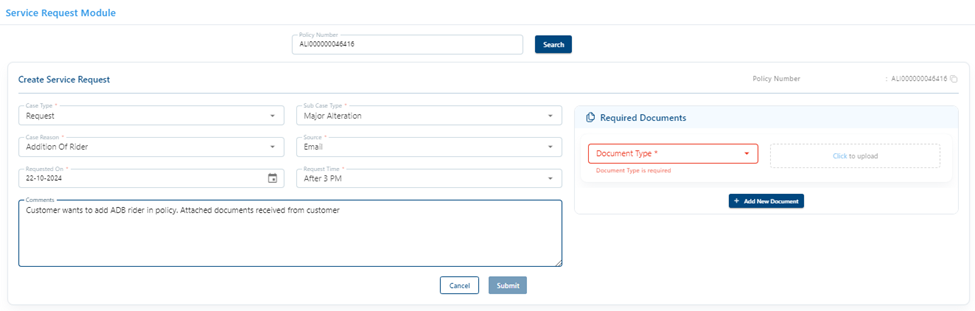
TOP UP
Points to remember for TOP up
Kapture Tagging
When customer asks top up process
Category: Post issuance
Case reason: Process enquiry Post issuance
Sub case reason: Top up
Ticket status: Resolved
Top up - iAssist
Please find below easy steps for top up.
1. Log in at https://iassist.bandhanlife.com/
2. Log in with your Aadhar linked mobile number
3. Select “Top up” under “Linked Investments”
4. Enter top up amount and select “Top up premium disclaimer”
5. Click on Proceed
6. Select your mode of payment
7. Enter payment details and proceed
You will receive confirmation once your payment is successful. Premium receipt of the same can also be downloaded via iAssist.
iAssist status wise log in
Points to Remember for iAssist status wise log in
Undermentioned is the table encompassing the policy status where a customer can yet login to iAssist and make changes to the policy.
Polices with “Not Issued” status customer will be able to view the details in iAssist only for 10 days from Rejection date. Post completion of the period it would reflect as “No data base found for this policy”.
Furthermore, polices which are in “Terminated” status can only be viewed in iAssist.
A customer with an active policy however unable to login or make changes in iAssist must be requested to share screenshot of the message displayed to investigate and resolve the issue.
| Status | Status Reason | Customer Can login to iAssist | Customer can make changes in iAssist |
| In Force | Benefit Payout In Process | Yes | No |
| In Force | Claim Registered | No | No |
| In Force | Grace Period | Yes | Yes |
| In Force | New Issue | Yes | Yes |
| In Force | Paid Up | Yes | Yes |
| In Force | Reduced Paid Up | Yes | Yes |
| In Force | Reduced Paid Up - No Revival | Yes | No |
| In Force | Reinstatement | Yes | Yes |
| In Force | Waiver of Premium | Yes | Yes |
| INFORCE | SURRENDER_INITIATED | Yes | Yes |
| Not Issued | Closed/Incomplete | No* | No* |
| Not Issued | Declined | No* | No* |
| Not Issued | Postponed for 12/ >12 months | No* | No* |
| Not Issued | Postponed for 3 months | No* | No* |
| Not Issued | Postponed for 6 months | No* | No* |
| Not Issued | Rejected | No* | No* |
| Not Issued | Withdrawn | No* | No* |
| Pending Issue | STANDARD | Yes | yes |
| Pending Issue | Underwriting Required | Yes | Yes |
| PENDING_ISSUE | REINSTATEMENT | Yes | Yes |
| Terminated | Auto Surrendered | Yes | No |
| Terminated | Cancelled for Reissue | Yes | No |
| Terminated | Death Claim Paid | Yes | No |
| Terminated | Lapsed | Yes | Yes |
| Terminated | Lapsed Paid | Yes | No |
| Terminated | Lapsed To Be Paid | Yes | No |
| Terminated | Matured | Yes | No |
| Terminated | Maturity Paid | Yes | No |
| Terminated | Maturity to Be Paid | Yes | No |
| Terminated | No Reinstatement | Yes | No |
| Terminated | No Reinstatement-Invalid claim | Yes | No |
| Terminated | Reinstatement Declined | Yes | No |
| Terminated | Renewal Premium Lapse within 3 years | Yes | Yes |
| Terminated | Rescinded | Yes* for short period | No |
| Terminated | Surrendered | Yes | No |
| Terminated | Surrendered Paid | Yes | No |
| Terminated | Surrendered To Be Paid | Yes | No |
Medical Reports
Existing Process
When customer asks for medical reports for tests conducted at the time of reinstatement agent to inform customer that medical reports can be downloaded via iAssist if customer is facing any issue then error screenshot to be asked for.
Documentation
Error screenshot
Disposition
When customer enquiries about medical reports of reinstatement-
Category: Post issuance
Case reason: Concern_post issuance
Sub case reason: Medical reports
Ticket status: Resolved
Pre-issuance medical report
We would like to inform that the medical reports would be accessible once the policy is issued in our system.
Please be informed that you may download your medical reports via our self-service portal https://iassist.bandhanlife.com/login/
Medical Reports- Reinstatement
We would like to inform you that you can download your reinstatement medical reports via our self-service portal iAssist
1. Visit https://iassist.bandhanlife.com/login/
2. Click on see more
3. Click on the down arrow on the “Medical Report” Tab
4. Click on the “Download Icon” against the respective medical test
In case if you experience any issue while downloading your reports we request you to share the error message from your registered email id on customer.care@bandhanlife.com so that we can find a swift solution for you.
Nominee Related
Points to remember for nominee related concern
➢ Total nominee allocation percentage is 100%
➢ As per IRDA regulations an appointee is mandatory to be appointed for a nominee who is a minor
➢ Customer can update nominee details via iAssist link i.e. https://iassist.bandhanlife.com/login/
➢ Once the nominee is updated on iAssist by the customer same will be reflecting in our records under ops console
➢ If in case customer is not able to update nominee via iAssist request customer for a screen shot
➢ We have stopped issuing nominee card on nominee change, communication will be sent to customer on nominee change request
Existing Process
If customer approaches us to update/change nominee in policy as per policy status agent to promote iAssist. If customer is facing any issue while updating his nominee via iAssist then error screenshot to be asked. If backend suggests then manual request can be taken.
Documentation
If customer is facing any issue then error screenshot needs to be asked. For manual request we would need details from registered email id i.e., name of nominee, relationship with policyholder, DOB of nominee and allocation percentage.
Kapture Tagging
When customer asks nominee process
Category: Post issuance
Case reason: Process enquiry Post issuance
Sub case reason: Nominee
Ticket status: Resolved
When customer faces issues via iAssist
Category: iAssist
Case reason: Concern_post issuance
Sub case reason: Personal details change
Ticket status: In progress (If summit is raised)
Nominee change Manual process (error screenshot received)
In case the nominee is a minor, you need to share the details of the appointee as well.
On receipt of the nominee details, your request to update nominee will be processed within 10 days.
We acknowledge your screenshot, and a request regarding your iAssist error has been registered in our records. We shall get back to you in 2 working days.
Nominee change – iAssist (error screenshot not received)
We would like to inform you that, to update your nominee you can visit our iAssist Portal. For better understanding we have shared the link and the steps below:
Further, if you are facing any issue while updating your nominee details kindly share the error screenshot for further assistance on customer.care@bandhanlife.com
We have received a request to update your nominee details.
We advise you to visit iAssist, for managing your policy.
It is easy to update your nominee details by following these simple steps:
If you experience any problem while updating your nominee details, you can send an email to customer.care@bandhanlife.com with your self-attested KYC and a screenshot of the error message so that we can investigate and address your issue.
An update will be shared with you within 2 working days and in case if it takes longer than usual to resolve the issue then we would support you by accepting the request manually.
Online premium payment - Renewal
Existing Process
Agent to check in system if we have received customers premium or no. Ops console, FFA suspense, premium and contract history to be checked. If customer cannot pay premium via website then need to ask for error screenshot. If customer has not shared error ss then agent can himself check on website and take error ss and raise H2H for same.
Documentation:
Error screenshot if customer complains about website error. If we have not received the amount but customer is saying that amount has been debited from his end then till date bank statement is required for further investigation
Kapture Tagging
If resolution is provided disposition would be:
Category: Payment
Case Reason: Concern_Payment
Sub Reason: Online premium payment - Renewal
Ticket Status: Resolved
If H2H is raised disposition would be:
Category: Payment
Case Reason: Concern_Payment
Sub Reason: Online premium payment - Renewal
Ticket Status: In progress
Draft - Where we have received premium
We would like to inform you that we have successfully received your premium amount of XXXX which was due on XXXXX.
We advise you to visit iAssist, a fantastic portal for managing your policy.
It’s easy to download your premium receipt and below are the simple steps:
1. Visit https://iassist.bandhanlife.com/login/
2. Click on see more option in the top right corner
3. Select the year you want to download the premium receipt for
4. Click on download
We ask that if you experience any problem while downloading your premium receipt, you can email screenshot of the error message that was displayed to customer.care@bandhanlife.com. This will make it easier for us to investigate the situation and find a quick solution for you.
An update will be shared with you within 2 working days and in case if it takes longer than usual to resolve the issue then we would support you by sharing your premium receipt on your registered email id.
Additionally we have attached payment acknowledgement receipt for your kind perusal.
Where holding is given
We acknowledge the receipt of your document.Policy Status
Existing Process
Agent to check and inform customer as per policy status updated in CX360 / Ops Console. While informing about status agent to elaborate it further what that status stands for Disposition
When customer asks process-
Category: Post issuance
Case reason: Concern
Sub case reason: Policy status
Ticket status: Resolved
When policy is active
We would like to inform you that your policy status is XXXXXX
For more details
you may also visit our self-service portal iAssist .
Renewal premium receipt
Points to remember for Premium Receipt
➢ Premium receipt can be downloaded via iAssist i.e. https://iassist.bandhanlife.com/login/
➢ If in case customer pays advance premium, acknowledgment receipt is generated
➢ Once the premium paid by the customer is applied towards the policy on its due date post which premium receipt is generated and shared to the customer on registered email ID
➢ Premium receipt can claimed under tax benefits
➢ Premiums receipt can be viewed in ops console under HM Document Viewer Tab
Documentation
If facing any issue on iAssist then error screen shot is required. If customer wishes to update full name on his premium receipt then he will have to share his aadhar card or any id proof and agent can take name change request as per aadhar. So from next receipt onwards full name (as per aadhar) would be printed.
Kapture Tagging
Category: Post issuance
Case reason: Request
Sub case reason: Renewal receipt
Ticket status: Resolved
We advise you to visit iAssist, for managing your policy.
It is easy to download your premium receipt by following these simple steps:
If you experience any problem while downloading the premium receipt, you can send an email to customer.care@bandhanlife.com with your self-attested KYC and a screenshot of the error message so that we can investigate it and address your issue.
An update will be shared with you within 2 working days and in case if it takes longer than usual to resolve the issue then we would support you by sharing your premium receipt on your registered email id.
Ops Console Request Tagging’s
| Update | Minor Alt Transform | Minor Alt Non-Transform |
| 1.GSTN no updating | 1.Neft Change | 1.Money out adjustment : No communication to Cust |
| 3.Renewal Premium Receipt | 2.Email Id Change | 2.NRI document : No communication to Cust |
| 4.Unit Statement | 3.Address Change | 3.Loan Disbursal Request : Trigger comm same as minor alt Transform for all below |
| 5.Provisional Tax certificate | 4.Mobile Number Change | 4.Change of Proposer |
| 7.Annuity benefits | 5.Change Of Nominee | 5.SPRI- Stop payment reissue |
| 6.Change in title | 6.Pan Change | 6.Post-issuance Excess premium refund |
| 7.Requirement pending shortfall | 7.Frequency change | 7.Deletion Of Rider |
| 8.Unit adjustment | 8.Name Change | 8.Correction of Proposer DOB |
| 9.Settlement option | 9.Deletion of Trigger Portfolio option-iMAX | |
| 10.Survival Benefit | 10.Removal of Invest protect Fund option | |
| 11.Red flag | 11.Income benefit option | |
| 12.Correction In Medical Reports | ||
| 13.IR update | ||
| 14.Loan Repayment | ||
| 15.Automated payment deletion | ||
| 16.Deletion of Life style option for Pension plan | ||
| 17.Old iTerm plan surrender request | ||
| 18.Addition of Life style option for Pension plan | ||
| 19.Assignment | ||
| 20.Removal Of Assignment | ||
| 21. Marital Status Change |
Group Policies
Points to remember for Group Polices
Scenario 1 –
In a scenario if the recipient asks a query, we will forward the email to Sandeep Yadav sandeep.yadav1@bandhanlife.com regarding the cases that aren't showing up in the ops console. Until the recipient receives a resolution, the agent will keep the email under follow up
Scenario 2 –
If a member approaches us with a claim query, we will check with the claims team and notify the member as soon as a resolution is received; until then, the case will remain active
Scenario 3 –
In the event of a death, the nominee's claim documents will be forwarded to the claims department, wherein the agent will acknowledge the nominee and close the case by sharing email ID of claims department i.e. claims@bandhanlife.com for upcoming correspondence
Scenario 4 –
When an agent is handling an award case, email will be forwarded to the complaints team. After acknowledging the member, the agent will share email ID of grievance department i.e., grievance.manager@bandhanlife.com for future correspondence and close the case
| Types of Insurance | What does it mean | Policy Details | Services | Spoc Name | |
| Affinity Insurance | Affinity insurance is an optional insurance offered with a product or service, to protect it against various risks | Policies details will reflect in iAssist | Sales | To: To: adarsh.unny@bandhanlife.com | 1. For sale of policy or for quotation |
| CC: Mayank Ravi mayank.ravi@bandhanlife.com, Vineeth Kumar V vineeth.v@bandhanlife.com | |||||
| Post Issuance | shreyas.kadam@bandhanlife.com, | 1. Cancellation | |||
| CC: Deepanwita Dey deepanwita.dey@bandhanlife.com | 2. Policy features and details | ||||
| 3. Change in personal details | |||||
| Legal cases: To: Marian and Prerna Verma, | 4. iAssist related issues | ||||
| CC: Rest all SPOC to be kept in CC | 5. Claims (directly to be sent to Claims Team) | ||||
| 6. Reward (Complaints / Consumer court cases) | |||||
| Claim cases: To: claims@bandhanlife.com, claimsupport@bandhanlife.com | |||||
| CC: Rest all SPOC to be kept in CC | |||||
Bandhan FAQ scenario wise drafts
Scenario 1: Who is Bandhan Financial Holdings Limited?
We would like to inform you that Bandhan Financial Holdings is a reputed Indian financial services company with commercial banking and microfinancing operations.
Scenario 2: Will the name of the Company be changed?
We would like to inform you that as per regulatory approvals, the name has been changed to XXXXXXX.
Please be rest assured the name change will not impact your policy in any way. Your policy terms, conditions, and benefits will remain intact.
Further the acquisition will not result in any modifications or alterations to your policy due to the name change.
Scenario 3: Will the website domain change?
We would like to inform you that our website has been upgraded to XXXXXXXXX (Link of website)
Please be rest assured the domain change will not impact your policy in any way. Further the iAssist app, and our dial-in numbers will continue to serve as the primary service channels.
Scenario 4: What happens to my existing policy?
We would like to inform you that your existing policy remains unchanged. There will be no impact on your policy, and you can continue to enjoy the all the benefits and coverage as outlined in your policy document.
We assure you of the stability and reliability of our services.
Scenario 5: Any changes to policy statements?
We would like to inform you that there will be no changes to your policy statements. All policy documents, statements, and
related paperwork will remain the same. You can rely on the accuracy and clarity of your
existing policy statements without any modifications.
Scenario 6: What will be the new service channels available?
We would like to inform you that XXXX website, the XXXXX app, and our dial-in numbers will remain active and accessible for customer service.
Please be rest assured in the future, if any new service channels are introduced, we will proactively inform you about them.
Scenario 7: Will the partner office also become a new service channel?
We would like to inform you that XXXXX website, the XXXX app, and our dial-in numbers will continue to serve as the primary service channels. At present, there are no plans to change the partner office into a new service channel.
If any changes occur in the future, we will provide advance notice and keep you informed.
Scenario 8: Will it impact my bonus or funds
We would like to inform you that there will be no impact on your bonus or funds. Our funds are among the highest rated in the industry, and you can continue to benefit from their performance.
We assure you of the stability and reliability of your bonus and funds without any changes resulting from this acquisition.
Scenario 9: Any change in corp. and distribution offices addresses? (Physical touchpoints)
We would like to inform you that there will be no change in corporate office addresses. You can continue to interact with us through XXXXX website, XXXXX app, and our dial-in numbers without any interruption in service.
In case of any future changes, we will notify you well in advance.
Scenario 10: What impact for customers looking to buy a new policy?
We would like to inform you that there will not be any impact on customers looking to buy a new policy. Our affordable products, simplified buying journeys, and enhanced customer features remain among the most competitive in the industry.
Furthermore, our industry-leading claims settlement process, with a success rate of 99.37%, will continue to provide efficient and reliable service.
For Customers
Introduction:
Aegon Life is now Bandhan Life!
Aegon Life is entering a new chapter and is now part of Bandhan Financial Holdings Ltd. (Bandhan group) This milestone combines our commitment to innovative insurance with Bandhan's robust financial backing, promising you a future of enhanced services and security. Your current policies and benefits remain secure and unchanged. We know you might have questions about what this change means for you. Here, address them, ensuring you feel confident and informed.
Welcome to Bandhan Life - where your financial well-being continues to be our priority.
Frequently Asked Questions
Who is Bandhan Financial Holdings Limited?
Bandhan Financial Holdings is a reputed Indian financial services company with commercial banking, asset management, and microfinancing operations which also uses its channels to distribute insurance. It operates through Bandhan Bank Limited, which has its headquarters in Kolkata and is listed on the National Stock Exchange of India and Bombay Stock Exchange. Bandhan Bank serves over 3 crore customers through over 6,000 banking outlets spread across India.
Bandhan Life Insurance is a strategic step into the life insurance sector and this acquisition marks a commitment to bring a diverse range of financial services under one umbrella.
What does the acquisition mean for existing customers?
Your current policy doesn’t get affected in any way and we continue to serve your needs with the same passion and commitment. With the support of Bandhan group, we are better positioned to meet your insurance needs with many more lines of product lines, maintaining our focus on your financial well-being.
As a customer, will there be any changes to policies issued by Aegon Life?
No, your existing policy and benefits remain unchanged. There will be no impact on your policy, and you can continue to enjoy the all the benefits and coverage as outlined in your policy document and you can be rest assured of the stability and reliability of our services.
Will there be any changes to policy statements?
There will be no changes to your policy statements.
How will the acquisition with Bandhan Financial Holdings enhance the services offered to me?
The acquisition combines our digital innovation with Bandhan’s legacy of trust, aiming to enhance our service quality and offerings. It has opened a new distribution arm for us. In addition to our current channels, Bandhan Life insurance policies will soon be available at the branches of Bandhan Bank. While we will reach out to more people, our core services remain intact, consistent, reliable, and accessible as always.
Will there be any changes in making claims or getting customer support?
The process for making claims and accessing customer support remains unchanged. We are committed to maintaining, and even improving, the efficiency and responsiveness you’ve come to expect from us. Click here to learn how you can initiate a claim.
Are there any changes in premium payments or policy renewal processes?
There are no premium payments or policy renewal process changes. You can continue to manage these your payments and renewals as you have been doing.
How can I access my insurance account and policy details?
You can continue to access your insurance account and policy details just as you always have, through our self-service portal iAssist. Log in to iassist.bandhanlife.com with your registered mobile number and get access to the details of all your policies with us on one platform. You can update your personal details, nominee details, and payment settings using iAssist. All your account information remains secure and easily accessible. Use any of the customer assistance channels below and we’ll be happy to assist you.
Who should I contact for assistance or inquiries about my policy during the transition?
Please continue using the existing channels for assistance or inquiries. Our dedicated customer service team remains at your service to address any questions or concerns you might have. You can contact customer care at
Use any of the customer assistance channels below and we’ll be happy to assist you.
How will the acquisition impact the company’s commitment to customer service and satisfaction?
The acquisition strengthens our commitment to customer service and satisfaction. We are more equipped than ever to meet your needs ensuring that you continue to receive the high-quality service you're accustomed to.
Will there be any change in corp. and distribution office addresses? (Physical touchpoints)
There will be no change in corporate office addresses. You can continue to interact with us through Bandhan Life's website, the iAssist portal, and our dial-in numbers without any interruption in service. In case of any future changes, we will notify you well in advance.
Will it impact my bonus or funds?
There will be no impact on your bonus already declared or funds. Our funds are among the highest rated in the industry, and you can continue to benefit from their performance. We assure you of the stability and reliability of your bonus and funds without any changes resulting from this acquisition.
What impact for customers looking to buy a new policy?
There will not be any impact on customers looking to buy a new policy. Our affordable products, simplified buying journeys, and enhanced features remain among the most competitive in the industry. Furthermore, our industry-leading claims settlement ratio of 99.37%, will continue to provide efficient and reliable service.
I was in the process of buying an Aegon Life policy. Will there be any impact to my application on account of the name change?
All the features and benefits will remain unchanged, and there is no impact on our policy issuance processes so you do not need to worry. If you have any questions, please reach out to our customer service channels and we will be happy to assist you.
Will new insurance products or services be introduced following the acquisition?
The acquisition strengthens our commitment to customer service and satisfaction. We are more equipped than ever to meet your needs ensuring that you continue to receive the high-quality service you're accustomed to.
Chat Process flow
Agent to not miss an opportunity to cross sell. Only if customer is irate agent will not do cross selling.
How may I help you today?
Please allow me a moment while I gather relevant information for you.
Can you please help me with your policy number, to fetch relevant details for you?
Thank you for sharing! Please hold on while I check the records.
Surely! I will assist you with the same.
Thank you for being so patient!
May I know if you are still online?
Since, there is no response from your end I have to close the chat!
Is there anything else apart from this that I may assist you with?
We sincerely apologize for the inconvenience caused to you.
Would request you to elaborate on your concern so that I can serve you more effectively.
Have I satisfactorily handled your issue? (Do not use this when the customer is irate)
Thank you for choosing Bandhan Life Insurance, have a wonderful day ahead!
Draft Header Alignment
When call connects
Dear XXXX
Thank you for your time on call.
This is with reference to our telephonic conversation dated XXXXXX, with regards to XXXXXXXX 00000000.
When call doesn’t connect
Dear XXXX,
Thank you for writing to us.
This is with reference to your email dated XXXXXX, with regards to XXXXXXXX 00000000.
We tried reaching out to you via call on XXXXXXX at XXXXXX but couldn’t establish connection with you as the number went ringing/ number was busy/ as the line was switch off.
Hold refresh on emails – Date is not required as we are doing a top up on same email
Dear XXXX,
In continuation to your below email we are still working on your query. Please allow additional 2 days while we update you with the resolution.
General Drafts
Header
Dear XXXXX,
Thank you for your time on call.
This is with reference to our telephonic conversation dated 0000, with regards to <Plan Name> < Policy Number>.
Footer
Thank you for choosing Bandhan Life Insurance for your insurance needs.
You can also reach us through the following channels:
Regards,
Customer Service
Bandhan Life Insurance Limited
Opening Sentences
Apology Sentences
Closing Sentences
We trust to have addressed your concerns adequately.
We trust to have addressed your concerns to your satisfaction.
We trust that we have clarified your apprehensions appropriately.
We assure you of our best services always.
We trust that we have satisfactorily been able to clarify your concern.
Trust we have satisfactorily clarified the matter
We trust the matter stands clarified to your satisfaction.
Hope your query is addressed satisfactorily.
We thank you for your understanding in this matter and trust that we have been able to address your apprehension suitably.
Should you require any further assistance please feel free to write and we shall be glad to assist you
We thank you for choosing us for your insurance related needs and assure you of our best services always.
We thank you for your co-operation in this regard.
We thank you for your understanding and request you to continue accruing benefits under the chosen plan.
We value your patronage and look forward to a long and mutually beneficial relationship.
We thank you for your patience and understanding and look forward to your co-operation in this regard.
We thank you for your patience and understanding in this regard.
We look forward to your cooperation in this regard.
We thank you for your understanding and look forward to a fruitful association with you.
We regret any inconvenience caused and hope to re-establish our relationship sometime in the future.
Looking forward to your continued patronage as a very valued customer and assuring you the best of services and facilities always
We thank you for your valuable time to provide us with your feedback. We assure you that basis your feedback, we shall take appropriate actions to further improve on our service standards.
We value your patronage and look forward to serving you better.
Please feel free to contact us, should you need any further information. We shall be glad to assist you.
We hope that we have been successful in clearing all your doubts regarding this policy
Basic Holding
For any customer service request received:
We wish to inform you that we have forwarded your XXX request to our processing unit and shall reply to you within XXX working days.
Please note that we are looking into your request and will get back to you within XXX working days. Request your patience and co-operation in the interim.
For investigation cases
We are in the process of investigating the matter and shall revert to you within XXX working days.
Your matter/request is under investigation and we will revert to you within XXX working days.
As discussed, customer has already updated new nominee in his policy , hence as per his query I have share the process of nominee card.
We would like to inform you that request is registered to surrender the policy and request will get processed in 15 days.
Dear XXXXX,
Thank you for your time on call.
This is with reference to our telephonic conversation dated 0000, with regards to <Plan Name> < Policy Number>.
Thank you for choosing Bandhan Life Insurance for your insurance needs.
You can also reach us through the following channels:
Regards,
Customer Service
Bandhan Life Insurance Limited
Inbound Script
Inbound Script - WhatsApp number - 9867452226
CSE: - Welcome! To Bandhan Life, this is ____________, how may I assist you? (Greet & Opening)
Customer: - Wait for customer query.
CSE: - Definitely! I will assist you with same! (Assurance Statement)
For General Enquiry
CSE: - NO Verification Required
For Non-General Enquiry
1. If a customer is calling from registered mobile number & is enquiring about policy details/ process details
- No verification is required
2. If the customer is calling from non-register mobile number, then, please follow the below grid

3. If the Nominee/Life Assured is calling from the registered number, 2-point verification to be taken from the below grid
|
Sr. No. |
Verification Grid |
|
Registered contact numbers |
|
|
TOTAL 2 Questions from the below list |
|
|
1 |
DOB of PH |
|
2 |
Email id |
|
3 |
Communication address |
|
4 |
Premium amount |
|
5 |
Premium Frequency |
|
6 |
Name of nominee |
|
7 |
Sum Assured |
CSE: - May I place your call on hold to check necessary details for you? (HOLD Process)
Customer: - Ok/Yes
CSE: - Thank you! (Acknowledge)
CSE: - Thank you for your patience! (Un hold Process)
CSE: - To answer the query asked by customer.
CSE: - Is there anything else, I may assist you with? (Further Assistance - To be asked only once in overall call)
Customer: - No/Thank you!
CSE: -Thank you for calling Bandhan life. Have a Nice Day! (Closing)
Technical & Non-technical
Points to Remember while raising a Summit
Non-Technical stakeholder grid
| Queries | Sub Query | Non-Technical | Stake Holder | First level of Escalation | Second level of Escalation | Summit to be raised |
| Payout | For any payout related issue | Yes | Finance team | To : bandhanlife@corpsolutions.in , banking@bandhanlife.com , monikha.kotian.hgs@bandhanlife.com , aruna.prasanna.hgs@bandhanlife.com | mayank.agarwal1@bandhanlife.com | No |
| LSBO | Medical Related | Yes | POS Team | To : purnima.gupta@bandhanlife.com, | sophiya.sayed1@bandhanlife.com | No |
| Reinstatement | Medical Related | Yes | POS Team | To : priya.rawool.hgs@bandhanlife.com , shivangi.singhai@bandhanlife.com | sophiya.sayed1@bandhanlife.com | No |
Technical stakeholder grid
| Queries | Technical | Stake Holder | First level of Escalation | Second level of Escalation | Summit to be raised |
| Premium related Issues | Yes | Tech Team | To: l1.support@bandhanlife.com, ganeshkumar.das.tcs@bandhanlife.com, diksha.rajput@bandhanlife.com | satish.a@bandhanlife.com | Yes |
| Log in related issues | Yes | Tech Team | To: l1.support@bandhanlife.com, ganeshkumar.das.tcs@bandhanlife.com, diksha.rajput@bandhanlife.com | santosh.swami1@bandhanlife.com | Yes |
| Auto Debit queries | Yes | Tech Team | To: l1.support@bandhanlife.com, ganeshkumar.das.tcs@bandhanlife.com, diksha.rajput@bandhanlife.com | satish.a@bandhanlife.com | Yes |
| Reinstatement Related | Yes | Tech Team | To: l1.support@bandhanlife.com, ganeshkumar.das.tcs@bandhanlife.com, diksha.rajput@bandhanlife.com | santosh.swami1@bandhanlife.com | Yes |
| FFA polices | Yes | FFA Team | To: ffa.prod.support@bandhanlife.com | chinta.chiranjeevi.dxc@bandhanlife.com | Yes |
POS Files
| Types of Files | File Details | How to search |
| Unclaimed File -\\10.151.2.7\006-cs\Service | The agent can look up for payouts processed earlier than six months | By policy number or payout amount |
| Unsafe and Safe data- \\10.151.2.7\006-cs\Service | Agent will be able to check for safe and unsafe policy | By policy number |
| Cheque dispatch data - \\10.151.2.7\006-cs\Service | This file will reflect with the AWB number, status of the cheque clearance , and the details of the cheque. | By policy number |
| BANK STATEMENT HDFC POLICY PAYOUT File | This file will share UTR number for the payment processed | Search by customer name or payout amount |
| Cheque payout File | This file is an Alternative of Cheque dispatch data file | By policy number |
| Reconciled File | This file will reflect the clearance cheque status of old cheques | By policy number and cheque number |
| Conso File | Agent will be able to check if the premium paid by the customer is received or not | By policy number |
| HDFC CSV file | Agent can check the status of the failed payout reflecting in ops console under refund info Tab | By policy number |
| Loan file | Agent can check principle and interest amount | By policy number |
For pending documents
Dear XXX,
We would like to inform you that we tried reaching out to you via call at XXXXXX on XXXXXX but couldn’t establish a connection with you as the number went XXXXXX.
Further this is to remind you about your below mentioned pending documents (income proof, selfie photo/video verification /pending medicals/VMER pending)
Request you to kindly mail us same on XXXXX (Agent to mention their email id)
We assure you of our best services always.
Regards,
<Agent Name>
Sales Team
Bandhan Life Insurance Limited
For pending Medicals
Dear XXX,
We would like to inform you that we tried reaching out to you via call at XXXXXX on XXXXXX but couldn’t establish a connection with you as the number went XXXXXX.
Further this is to remind you about your below mentioned pending medicals:
Request you to kindly let us know when we can schedule your appointment for pending medicals. In case of any concern feel free to write to us on XXXXX (Agent to mention their email id).
We assure you of our best services always.
Regards,
<Agent Name>
Sales Team
Bandhan Life Insurance Limited
Counteroffer
Dear XXX,
We would like to inform you that we tried reaching out to you via call at XXXXXX on XXXXXX but couldn’t establish a connection with you as the number went XXXXXX.
Further this is to remind you that your Quote has been revised.
We appreciate the fact you have informed us about your habits & health factors.
After evaluating your application and the medical test report, we have to revise your premium. For your benefit, we have created alternatives for you to choose from between.
Your premium was revised due to following observation: Personal habits of tobacco / alcohol consumption.
This revised offer is valid for 30 days or till your next birthday whichever is earlier B. Post receiving the e-mail acceptance and additional premium (if levied) your proposal will be issued.
We assure you of our best services always.
Regards,
<Agent Name>
Sales Team
Bandhan Life Insurance Limited
For Quote sharing
Dear Customer,
Thank you for choosing Bandhan as your life insurance partner.
You are just minutes away from ensuring a lifetime of security for your family.
Please find below quotation as per our discussion/I have attached quotation as per our discussion.
We would like to hear from you soon.
We assure you of our best services always.
Regards,
<Agent Name>
Sales Team
Bandhan Life Insurance Limited
For Follow up
Dear Customer,
Thank you for choosing Bandhan as your life insurance partner.
You are just minutes away from ensuring a lifetime of security for your family.
We would like to inform you that we tried reaching out to you via call at XXXXXX on XXXXXX but couldn’t establish a connection with you as the number went XXXXXX.
Request you to kindly let us know when we can call you back to help in buying the policy. In case of any concern feel free to write to us on XXXXX (Agent to mention their email id)
We assure you of our best services always.
Regards,
<Agent Name>
Sales Team
Bandhan Life Insurance Limited
Verification Grid
|
Case reason |
Sub case reason |
Critical |
Remarks |
|||||||||||||||||||
|
Assignment |
Document receipt status |
No |
|
|||||||||||||||||||
|
Process enquiry |
No |
|
||||||||||||||||||||
|
Request status |
Yes |
|
||||||||||||||||||||
|
Auto debit related |
Activation status |
No |
Only in Yes / No |
|||||||||||||||||||
|
Auto debit mode change enquiry |
No |
Only process |
||||||||||||||||||||
|
Auto debit activation process enquiry |
No |
|
||||||||||||||||||||
|
Auto debit related others |
Yes |
|
||||||||||||||||||||
|
Deactivation status |
Yes |
|
||||||||||||||||||||
|
Dual payment issue (manual and auto debit) |
Yes |
|
||||||||||||||||||||
|
Bonus related |
NA |
Yes |
|
|||||||||||||||||||
|
Change in contact details |
Document receipt status |
No |
|
|||||||||||||||||||
|
Process enquiry |
No |
|
||||||||||||||||||||
|
Request status |
Yes |
|
||||||||||||||||||||
|
Change in initial proposal details |
Document receipt status |
No |
|
|||||||||||||||||||
|
Process enquiry |
No |
|
||||||||||||||||||||
|
Request status |
Yes |
|
||||||||||||||||||||
|
Change in premium frequency |
Document receipt status |
No |
|
|||||||||||||||||||
|
Process enquiry |
No |
|
||||||||||||||||||||
|
Request status |
Yes |
|
||||||||||||||||||||
|
Change of address |
Document receipt status |
No |
|
|||||||||||||||||||
|
Process enquiry |
No |
|
||||||||||||||||||||
|
Request status |
Yes |
|
||||||||||||||||||||
|
Change of name |
Document receipt status |
No |
|
|||||||||||||||||||
|
Process enquiry |
No |
|
||||||||||||||||||||
|
Request status |
Yes |
|
||||||||||||||||||||
|
Claims Documents |
NA |
No |
|
|||||||||||||||||||
|
Company Information related |
NA |
No |
|
|||||||||||||||||||
|
Death / Rider Claim - General Query |
NA |
No |
|
|||||||||||||||||||
|
DEATH / RIDER CLAIM STATUS QUERY |
NA |
No |
|
|||||||||||||||||||
|
Email Communication |
NA |
Yes |
|
|||||||||||||||||||
|
Enquiry about Fund value |
NA |
Yes |
|
|||||||||||||||||||
|
Enquiry for due premium |
NA |
No |
|
|||||||||||||||||||
|
Enquiry for surrender value |
NA |
Yes |
|
|||||||||||||||||||
|
First premium receipt |
NA |
No |
|
|||||||||||||||||||
|
FreeLook cancellation |
Document receipt status |
No |
|
|||||||||||||||||||
|
Process enquiry |
No |
|
||||||||||||||||||||
|
Request status |
Yes |
|
||||||||||||||||||||
|
Health Claim - General Query |
NA |
No |
|
|||||||||||||||||||
|
Increase in Premium amount |
NA |
Yes |
|
|||||||||||||||||||
|
Increase in Sum Assured |
NA |
Yes |
|
|||||||||||||||||||
|
Increase or Decrease in Premium Amount |
Increase or Decrease in Premium Amount |
Yes |
|
|||||||||||||||||||
|
Loans availability |
NA |
Yes |
|
|||||||||||||||||||
|
Maturity Benefits |
NA |
Yes |
|
|||||||||||||||||||
|
NEFT related |
Document receipt status |
No |
|
|||||||||||||||||||
|
Process enquiry |
No |
|
||||||||||||||||||||
|
Request status |
Yes |
|
||||||||||||||||||||
|
Nominee related |
NA |
Yes |
|
|||||||||||||||||||
|
Online premium payment |
Error 403 & 409 |
No |
|
|||||||||||||||||||
|
Online Premium Payment - Others |
No |
|
||||||||||||||||||||
|
Proceed to payment error |
No |
|
||||||||||||||||||||
|
Process/Steps to pay online |
No |
|
||||||||||||||||||||
|
Single payment option issue |
No |
|
||||||||||||||||||||
|
Submit to log in issue after policy number & DOB |
No |
|
||||||||||||||||||||
|
Online Related Issues/Process |
iAssist related |
No |
|
|||||||||||||||||||
|
Incorrect details of policy on portal |
Yes |
|
||||||||||||||||||||
|
Online Registration process |
No |
|
||||||||||||||||||||
|
Portal / E-Doc log in error |
No |
|
||||||||||||||||||||
|
Portal fund switch error |
No |
|
||||||||||||||||||||
|
Portal issues |
No |
|
||||||||||||||||||||
|
Portal registration error |
No |
|
||||||||||||||||||||
|
Portal Top up error |
No |
|
||||||||||||||||||||
|
Payout related |
Charge back related |
Yes |
|
|||||||||||||||||||
|
Discontinuance payout |
Yes |
|
||||||||||||||||||||
|
Freelook payout |
Yes |
|
||||||||||||||||||||
|
Name correction for refund cheque |
Yes |
|
||||||||||||||||||||
|
Post issuance excess premium refund |
Yes |
|
||||||||||||||||||||
|
Pre issuance refund related |
Yes |
|
||||||||||||||||||||
|
Re-issue of refund via NEFT |
Yes |
|
||||||||||||||||||||
|
RTO-cheque redispatch |
Yes |
|
||||||||||||||||||||
|
Surrender Payout |
Yes |
|
||||||||||||||||||||
|
Policy document |
NA |
No |
|
|||||||||||||||||||
|
Hardcopy of policy document not received |
NA |
No |
|
|||||||||||||||||||
|
Duplicate policy document |
NA |
No |
|
|||||||||||||||||||
|
Soft copy of policy document not received |
NA |
No |
|
|||||||||||||||||||
|
Policy features/details |
Policy features / details |
Yes |
|
|||||||||||||||||||
|
New product regulations |
Yes |
|
||||||||||||||||||||
|
Policy issuance related |
NA |
No |
|
|||||||||||||||||||
|
Policy lapse |
NA |
Yes |
|
|||||||||||||||||||
|
Policy status |
NA |
No |
|
|||||||||||||||||||
|
Premium not auto debited |
Emandate |
Yes |
|
|||||||||||||||||||
|
EBPP |
Yes |
|
||||||||||||||||||||
|
Standing instruction |
Yes |
|
||||||||||||||||||||
|
NACH |
Yes |
|
||||||||||||||||||||
|
Premium Paid - Confirmation not received |
Premium paid via ECS |
Yes |
|
|||||||||||||||||||
|
Premium paid via Credit card / Debit card |
Yes |
|
||||||||||||||||||||
|
Premium paid via EBPP |
Yes |
|
||||||||||||||||||||
|
Premium paid via NACH |
Yes |
|
||||||||||||||||||||
|
Premium paid via Net banking |
Yes |
|
||||||||||||||||||||
|
Premium paid via SI |
Yes |
|
||||||||||||||||||||
|
Premium paid via Wallets / Apps |
Yes |
|
||||||||||||||||||||
|
Premium Payment at Branch/ Bank Related |
Yes |
|
||||||||||||||||||||
|
Provisional Tax Certificate |
NA |
No |
|
|||||||||||||||||||
|
Reinstatement |
Reinstatement - Assistance on document filling |
No |
|
|||||||||||||||||||
|
Reinstatement - Counteroffer |
Yes |
|
||||||||||||||||||||
|
Reinstatement - Documents receipt confirmation |
No |
|
||||||||||||||||||||
|
Reinstatement - Incomplete documents received |
Yes |
|
||||||||||||||||||||
|
Reinstatement - Medicals related |
No |
|
||||||||||||||||||||
|
Reinstatement - Payment gateway access |
Yes |
|
||||||||||||||||||||
|
Reinstatement - Process enquiry |
No |
|
||||||||||||||||||||
|
Reinstatement status |
Yes |
|
||||||||||||||||||||
|
Rejection/decline reason |
Yes |
|
||||||||||||||||||||
|
Request Declined – Non register email id/contact number |
NA |
|
||||||||||||||||||||
|
Renewal Premium Receipt |
NA |
No |
|
|||||||||||||||||||
|
Renewal Premium related |
Renewal Premium due amount |
No |
|
|||||||||||||||||||
|
Renewal Premium due date |
No |
|
||||||||||||||||||||
|
Renewal Premium history |
Yes |
|
||||||||||||||||||||
|
Surrender |
Document receipt status |
No |
|
|||||||||||||||||||
|
Process enquiry |
No |
|
||||||||||||||||||||
|
Request status |
Yes |
|
||||||||||||||||||||
|
Surrender charges |
Yes |
|
||||||||||||||||||||
|
Survival Benefit Cheque |
NA |
Yes |
|
|||||||||||||||||||
|
Sr. No. |
Verification Grid |
|||||||||||||||||||||
|
Registered contact numbers |
||||||||||||||||||||||
|
TOTAL 2 Questions from the below list |
||||||||||||||||||||||
|
1 |
DOB of PH |
|||||||||||||||||||||
|
2 |
Email id |
|||||||||||||||||||||
|
3 |
Communication address |
|||||||||||||||||||||
|
4 |
Premium amount |
|||||||||||||||||||||
|
5 |
Premium Frequency |
|||||||||||||||||||||
|
6 |
Name of nominee |
|||||||||||||||||||||
|
7 |
Sum Assured |
|||||||||||||||||||||
|
NON - Registered contact numbers |
||||||||||||||||||||||
|
TOTAL 4 QUESTIONS from below list |
||||||||||||||||||||||
|
1 |
PAN card ( mandatory) |
|||||||||||||||||||||
|
2 |
DOB of PH ( mandatory) |
|||||||||||||||||||||
|
2 |
Last 4 digits of bank account number updated in our records for NEFT ( if same available / updated in FFA) |
|||||||||||||||||||||
|
3 |
Complete communication address with pin code |
|||||||||||||||||||||
|
4 |
How did you make your last premium payment |
|||||||||||||||||||||
|
5 |
Fathers / Mothers name |
|||||||||||||||||||||
|
6 |
Nominee DOB |
|||||||||||||||||||||
|
7 |
Life Assured name & DOB |
|||||||||||||||||||||
|
|
||||||||||||||||||||||
Verification Updates
Agents can share basic information such as the due date, grace period, premium amount, and payment process, even if the customer calls from an unregistered contact number. This measure aims to prevent policy lapsation.
While sharing this information on an unregistered call, if the customer requests details about payouts, bonus, maturity, or any other policy-related information, agents are required to verify the policy holder. If the agent fails to verify the policy holder, the call will be marked as Fatal.
Survival Payout
Survival Payout can be viewed on iAssist
Screenshots of the journey
Check whether Pay-out centre widget available

Product name, Policy number, Sum assured, Premium and policy status on card.

Check Payout details are reflecting on UI.

After click on view more case

Payout not eligible policy

Steps to check policy specific payouts in FFA
Step 1: Under “Premium Collections” Select “Money Out Workbench”

Step 2: Click on “…”

Step 3: Enter policy number in “Contract No.” and click on “Search”


Step 5: Click on “Search” again

Step 6: Policy specific payouts will reflect

Scroll right for additional information

Fund Switch Eligibility-Via iAssist
Increase in UPI limit_Renewals
This is to bring to your attention that UPI limit for auto debit has increased for renewals with effect from 16 th October 2024 as mentioned below:
|
Product Type |
Renewal |
|
Term product |
From 15k to 83K |
|
Trad product |
From 15k to 95k |
|
ULIP product |
From 15k to 1lac |
If you encounter any issues reported by customers, please send the details along with an error screenshot to Ravindra Shelar.
Process Note:
We would like to inform you that your policy status is currently "In Force Paid Up" since the premium payment term has been completed on XXXXX.
Your policy is scheduled to mature on [XXXXX].
2. In force grace period (Monthly)
Please be informed that your policy is currently in “In Force Grace Period” status, as the premium was due on [XXX]. You have a grace period of 15 days from this due date.
To ensure continuity of your policy benefits, please make the payment by [XXXX].
3. In force grace period (Annual)
Please be informed that your policy is currently in “In Force Grace Period” status, as the premium was due on [XXX]. You have a grace period of 30 days from this due date.
To ensure continuity of your policy benefits, please make the payment by [XXXX].
4. Terminated Lapsed (Monthly):
We regret to inform you that your policy has lapsed, and as a result the renewal premium payments can no longer be accepted.
Please be aware that the premium due date was [XXX]. A 15-day grace period was provided following this date, after which the policy had lapsed due to non-payment.
5. Terminated Lapsed (Annual):
We regret to inform you that your policy has lapsed, and as a result the renewal premium payments can no longer be accepted.
Please be aware that the premium due date was [XXX]. A 30-day grace period was provided following this date, after which the policy had lapsed due to non-payment.
6. Terminated-No Reinstatement
We regret to inform you that the status of your policy is “Terminated - No Reinstatement”, This means that your policy has been discontinued and cannot be reinstated as the revival period has expired.
According to the policy terms and conditions, the revival period of XX years began from the last due date (XXXX) of the first unpaid premium and ended on [XXX].
Additionally, as per the policy terms there is no discontinuance amount applicable to your policy.
You may consider applying for a new policy to meet your current needs. Please note that factors such as your present age, health conditions, and income will be taken into account while evaluating your eligibility for a new policy.
7. Terminated-Lapsed to be paid (NEFT detail updated)
We would like to inform you that your policy status is “Terminated - Lapsed to be Paid” due to non-payment of premiums since [XXXX].
Please note that there is a five-year lock-in period. As a result, even though the policy has been terminated, the discontinuance payout will be released only after the completion of five years, i.e., on [XXXX]. The approximate current fund value is Rs. [XXXX/-].
Below are the NEFT details currently updated in our records. You may check the same by visiting our self-service portal iAssist:
Further if you wish to change your updated bank details, please send us one of the following documents from your registered email address, along with a scanned copy of your Aadhaar card or passport:
Once we receive these documents, we will process your request to update the NEFT details within 7 calendar days. You can review your updated details by visiting our self-service portal, iAssist.
8. Terminated-Lapsed to be paid (NEFT detail not updated)
We would like to inform you that your policy status is “Terminated - Lapsed to be Paid” due to non-payment of premiums since [XXXX].
Please note that there is a five-year lock-in period. As a result, even though the policy has been terminated, the discontinuance payout will be released only after the completion of five years, i.e., on [XXXX]. The approximate current fund value is Rs. [XXXX/-].
To update your NEFT details, please send us one of the following documents from your registered email address, along with a scanned copy of your Aadhaar card or passport:
Once we receive these documents, we will process your request to update the NEFT details within 7 calendar days. You can review your updated details by visiting our self-service portal, iAssist.
9. Terminated-Lapsed paid - NEFT
Please be informed that your policy status is “Terminated - Lapsed Paid,” and the discontinuance payout of Rs. [XXXX/-] was released via NEFT on [XXXX].
Below are the NEFT details recorded in our system:
If you have not received the discontinuance payout, please provide your bank statements up to the current date for further investigation.
10. Terminated-Lapsed paid - Cheque
Please be informed that your policy status is “Terminated - Lapsed Paid,” which means your policy has been auto surrendered and the discontinuance payout of Rs. [XXXX/-] was released via cheque on [XXXX].
Below are the cheque details recorded in our system:
If you have not received the discontinuance payout, please provide your bank statements up to the current date for further investigation.
11. In force reduce paid up (need to send this within 180 days):
Please be informed that your policy status is “In Force Reduced Paid-Up,” indicating that the policy remains active but with limited benefits due to non-receipt of premiums since [XXXX].
To fully enjoy all the benefits of your policy, we request that you make the necessary premium payment of XXXXX. You can make your renewal premium payment using any of the following options at your convenience:
Option 1 - You can make an online payment using your credit card, debit
card or net banking by visiting our self service portal iAssist: https://iassist.bandhanlife.com/login/
Option 2 - You can make an online payment using your credit card, debit card, UPI or net banking by visiting our website https://www.bandhanlife.com/pay-my-premium
12. In force reduce paid up-No revival
Please be informed that your policy status is “In Force Reduced Paid-Up No Revival” due to non-receipt of premiums since [XXXX]. The policy cannot be reinstated as the revival period has expired.
According to the policy terms and conditions, the revival period of XX years commenced from the last due date of the first unpaid premium (XXXX) and ended on [XXX].
Excess Premium Refund
Process Note:
Excess premium amount reflecting in system - NEFT is not updated
Dear XXXX,
Thank you for writing to us.
This is with reference to your email dated XXX, with regards to <Plan Name> <Policy Number>.
We would like to notify you that, we have an excess premium amount reflecting in our records. To proceed with your refund, request you to update your bank details.
Further, to update NEFT details, we advise you to visit iAssist by following these simple steps:
If you experience any issues while logging into iAssist , please contact us at customer.care@bandhanlife.com with a self-attested copy of your KYC and a screenshot of the error message.
If you experience any problem while updating your NEFT details, you can send us an email with your self-attested Aadhar card, copy of cancelled cheque or latest bank statement reflecting policy holder name, account number, MICR code and IFSC code.
We will investigate the issue and aim to provide a resolution within 2 working days. If it takes longer than usual to resolve the issue, then we would support you by accepting the request manually.
Once a request is raised for refund it will be processed within 7 calendar days.
If you have any questions or need further assistance, please do not hesitate to reach out. We are here to support you on every step of the way.
Thank you for choosing Bandhan Life Insurance for your insurance needs.
You can also reach us through the following channels:
Regards,
Customer Service
Bandhan Life Insurance Limited
Excess Premium - Monthly frequency – NEFT not updated
Dear XXXX,
Thank you for writing to us.
This is with reference to your email dated XXX, with regards to <Plan Name> <Policy Number>.
We would like to notify you that, we have an excess premium of XXXX reflecting in our records.
Please be informed that the excess amount will be adjusted towards the next due premium i.e., XXXX.
Once the premium is applied you can download the premium receipt by visiting our self-service portal iAssist .
Further, if you wish for a refund kindly give us a consent from registered email address and you may update the NEFT details by following the below mentioned simple steps.
If you experience any issues while logging into iAssist , please contact us at customer.care@bandhanlife.com with a self-attested copy of your KYC and a screenshot of the error message.
If you experience any problem while updating your NEFT details, you can send us an email with your self-attested Aadhar card, copy of cancelled cheque or latest bank statement reflecting policy holder name, account number, MICR code and IFSC code.
We will investigate the issue and aim to provide a resolution within 2 working days. If it takes longer than usual to resolve the issue then we would support you by accepting the request manually.
Once a request is raised for refund it will be processed within 7 calendar days.
If you have any questions or need further assistance, please do not hesitate to reach out. We are here to support you on every step of the way.
Thank you for choosing Bandhan Life Insurance for your insurance needs.
You can also reach us through the following channels:
Regards,
Customer Service
Bandhan Life Insurance Limited
Excess Premium - Monthly frequency – NEFT updated
Dear XXXX,
Thank you for writing to us.
This is with reference to your email dated XXX, with regards to <Plan Name> <Policy Number>.
We would like to notify you that, we have an excess premium of XXX reflecting in our records.
Please be informed that the excess amount will be adjusted towards the next due premium i.e., XXXX.
Once the premium is applied you can download the premium receipt by visiting our self-service portal iAssist .
Further, if you wish for a refund kindly give us a consent from registered email address. So that a request can be raised in our system and your refund can be released in the below mentioned NEFT details updated in our records:
Once a request is raised for refund it will be processed within 7 calendar days.
If you have any questions or need further assistance, please do not hesitate to reach out. We are here to support you on every step of the way.
Thank you for choosing Bandhan Life Insurance for your insurance needs.
You can also reach us through the following channels:
Regards,
Customer Service
Bandhan Life Insurance Limited
Excess Premium – Annual frequency – NEFT not updated
Dear XXXX,
Thank you for writing to us.
This is with reference to your email dated XXX, with regards to <Plan Name> <Policy Number>.
We would like to notify you that, we have an excess premium of XXXX reflecting in our records.
Further in order for us to initiate your refund kindly give us a consent from registered email address and you may update the NEFT details by following the below mentioned simple steps.
If you experience any issues while logging into iAssist , please contact us at customer.care@bandhanlife.com with a self-attested copy of your KYC and a screenshot of the error message.
If you experience any problem while updating your NEFT details, you can send an email with your self-attested Aadhar card, copy of cancelled cheque or latest bank statement reflecting policy holder name, account number, MICR code and IFSC code.
We will investigate the issue and aim to provide a resolution within 2 working days. If it takes longer than usual to resolve the issue, then we would support you by accepting the request manually.
If you have any questions or need further assistance, please do not hesitate to reach out. We are here to support you on every step of the way.
Thank you for choosing Bandhan Life Insurance for your insurance needs.
You can also reach us through the following channels:
Regards,
Customer Service
Bandhan Life Insurance Limited
Excess Premium – Annual frequency – NEFT updated
Dear XXXX,
Thank you for writing to us.
This is with reference to your email dated XXX, with regards to <Plan Name> <Policy Number>.
We would like to notify you that, we have an excess premium of XXX reflecting in our records.
Further in order for us to initiate your refund kindly give us a consent from registered email address so that a request can be raised in our system and your refund can be released in the below mentioned NEFT details updated in our records:
Once a request is raised for refund it will be processed within 7 calendar days.
If you have any questions or need further assistance, please do not hesitate to reach out. We are here to support you on every step of the way.
Thank you for choosing Bandhan Life Insurance for your insurance needs.
You can also reach us through the following channels:
Regards,
Customer Service
Bandhan Life Insurance Limited
Kapture Tagging
Request Raised-Excess premium refund.
Dear XXXX,
Thank you for writing to us.
This is with reference to your email dated XXX, with regards to <Plan Name> <Policy Number>.
We would like to inform you that, we have registered your request for excess premium refund and the same will be processed within 7 calendar days.
The request reference number is _________.
Please find below NEFT details updated in our records.
If you have any questions or need further assistance, please do not hesitate to reach out. We are here to support you on every step of the way.
Thank you for choosing Bandhan Life Insurance for your insurance needs.
You can also reach us through the following channels:
Regards,
Customer Service
Bandhan Life Insurance Limited
Kapture Tagging
Steps to check excess premium on website

Steps to check excess premium on FFA
Step1: Click on premium collection after that click suspense queue

Step 2: Click on …

Step 3: Enter policy number and click on policy holders name

Step 4: Excess premium can be checked under “Premium Billing Arrangement Suspense”

Steps to check excess premium in Ops Console – Payment Info
